How to Improve Multi-Reference Image Results in Flux.2 Klein with ComfyUI
Hello creators and creative friends. If you have been using Flux.2 Klein for a while, you may have already run into one frustrating issue: when you feed it multiple reference images, the results can become inconsistent, messy, or just plain wrong.
Sometimes the outfit is correct, but the face changes. Sometimes the face is close, but the background drifts. And sometimes the model completely misunderstands the body structure or anatomy.
In this article, we will look at a practical way to improve multi-reference workflows in ComfyUI using a custom node called Flux Klein Ref Grid. This node can stitch multiple reference images into a single grid image, helping Flux 2 Klein process several visual references more reliably.
We will also compare it with ComfyUI’s built-in Image Stitch node and discuss when each method makes sense.
The Problem with Multiple Reference Images
Flux.2 Klein can work well with reference images, but things get more difficult when you start giving it several references at once.
For example, imagine a workflow using only 3 reference images. The output can still contain visible errors.
That is the core problem:
- The model may fail to combine all references correctly.
- It may preserve one element while losing another.
- It may introduce anatomy problems.
- It may change the face, clothing, pose, or background unexpectedly.
So even with a relatively small number of references, Flux 2 Klein does not always produce a clean result.
That leads to the big question:
How can we get better results when working with multiple reference images?
Introducing the Flux Klein Ref Grid Node
The custom node we are looking at is called Flux Klein Ref Grid.
Its purpose is simple but useful: it stitches multiple reference images into a single grid image, then feeds that stitched result into the Flux Klein workflow.
You can install it by searching for:
ComfyUI-KleinRefGrid
inside ComfyUI Manager.
How the Flux Klein Ref Grid Node Works
The Flux Klein Ref Grid node is designed to take up to four reference images and stitch them into a 2×2 grid.

That stitched image is then injected as reference latents into the conditioning stream for the Flux Klein 9B model.
In simpler terms, instead of asking the model to understand several separate images, we combine those images into one organized reference grid. The model then receives that grid as if it were a single reference image.
This can make the workflow more stable.
Why Black Space Appears
When you use fewer than four images, you may notice extra black space in the stitched grid.
For example, if you only provide two images, the node still prepares a 2×2 grid. Since only two grid slots are filled, the remaining empty slots become black space.
That is expected behavior because the node is built around a fixed 2×2 structure.
Fixed Tile Normalization
Another important detail is that each grid section gets normalized into a fixed 1000×1000 tile.
This means every image in the grid is placed into a standardized tile size. That helps keep the reference layout consistent and easier for the model to process.
Test 1: Using Two and Three Reference Images
For the first test, the prompt is:
woman wearing dress, standing in a tropical resort walkway
The goal is to make Flux 2 Klein combine elements from the reference images into one final output.
In one version, only two reference images are used. In another version, three reference images are used.
When the outputs are compared side by side, the result from the Flux Klein Ref Grid workflow shows better stability. It helps reduce some of the visible errors and improves consistency.
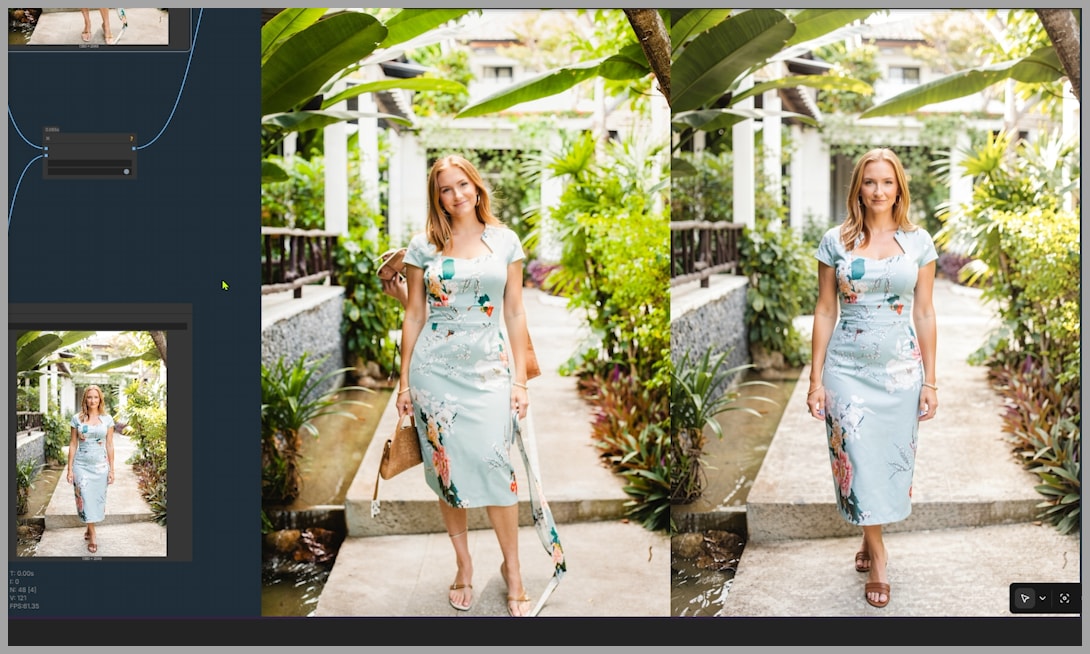
This does not mean the result is perfect. But compared to feeding multiple references directly, the Ref Grid node gives the model a cleaner structure to work with.
The important takeaway from this first test is:
Flux Klein Ref Grid can help reduce errors when multiple references are involved, even with only two or three images.
Test 2: Using Five Reference Images
Next, let’s increase the difficulty.
This workflow uses five reference images.
The prompt is:
woman wearing printed t-shirt, floral skirt and a handbag, standing on short staircase
Here, the model has to combine several different visual elements:
- A printed t-shirt
- A floral skirt
- A handbag
- A staircase setting
- A consistent woman or portrait identity
If you have tested Flux 2 Klein with many reference images before, you probably already know the challenge: the more references you add, the harder it becomes to get a satisfying result.
But interestingly, the Flux Klein Ref Grid node does not simply stitch all five images together.
Instead, it stitches all reference images except the first one.
The stitched image appears as a 2×2 grid, and technically, that stitched grid counts as just one reference image. The first image remains separate, which is important because the main image is usually the most important reference.
In this case, the main image is not just about the clothes or the background. The portrait of the woman matters most.
So the real question becomes:
Can the Ref Grid node improve the odds of combining many elements while still preserving the most important reference?
The Trade-Offs of Using Ref Grid
When comparing the results, the image generated with the Ref Grid node does show some improvements.
For example, the clothing and handbag may look better. The outfit elements are combined more successfully, and the result may feel more controlled.
However, there are trade-offs.
In one comparison, the result from the Ref Grid node has decent clothes and handbag details, but the face and background do not fully match the original references.
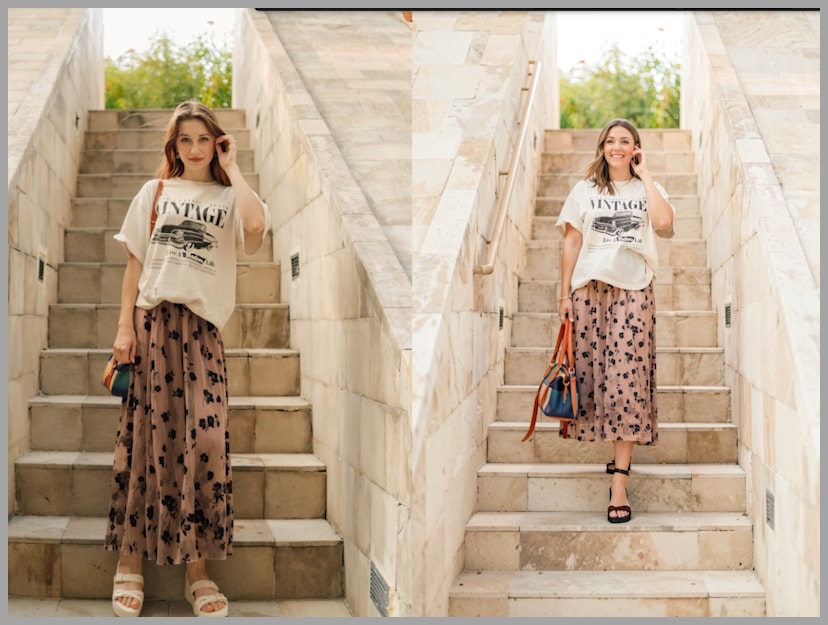
In another example with a different set of reference images, the face becomes more consistent, but the background changes quite a bit.
So the Ref Grid node is not a magic fix. It improves some parts of the workflow, but it may reduce consistency in other areas.
The trade-off usually looks like this:
- Better structure and fewer major mistakes
- Lower chance of strange anatomy errors
- Possible loss of exact face consistency
- Possible background changes
- Possible shifts in pose or styling
That means the node is useful, but you still need to test different reference combinations.
When Ref Grid Performs Much Better
Sometimes, using the Ref Grid node is clearly better than not using it at all.
In one test, the reference images include two headshots of the same woman from a portrait. The Ref Grid node stitches those references together and helps the model understand them as a structured reference set.

When comparing the output images, Flux 2 Klein makes obvious mistakes in the version without Ref Grid. It struggles to combine the visual elements properly, leading to a worse result.
With Ref Grid, the output is more stable.
This is where the node becomes really useful. Even if it does not preserve everything perfectly, it can prevent the model from producing broken or strange outputs.
So if Flux 2 Klein is giving you results with obvious visual mistakes, Ref Grid is worth testing.
The Number of Reference Images Is Not the Only Problem
After many tests, one important discovery becomes clear:
The number of reference images does not matter as much as you might think.
At first, it seems logical to assume that five references are harder than three, and three references are easier than five.
But the tests show that this is not always true.
In one example, Flux 2 Klein handles five reference images reasonably well. In another example, even with only three reference images, the model still creates anatomy problems.
That means the issue is not simply the number of references.
The deeper issue is that Flux 2 Klein has its own logic for combining different elements.
If your workflow follows that logic, you can often get the result you want. But if your references conflict with the model’s internal assumptions, you may lose consistency or end up with strange outputs.
This is why testing matters so much.
Ref Grid Reduces Risk, but Consistency May Still Shift
The Flux Klein Ref Grid node helps by making the references easier for the model to process.
It can reduce the chance of:
- Broken anatomy
- Strange body structure
- Incorrect object merging
- Chaotic multi-reference interpretation
- Major composition errors
However, it does not guarantee perfect consistency.
You may still see changes in:
- Face identity
- Background
- Clothing details
- Pose
- Lighting
- Overall style
So the best way to think about Ref Grid is this:
It improves your odds. It does not guarantee the exact result.
That is still valuable, especially when the alternative is a broken image.
Using ComfyUI’s Built-In Image Stitch Node Instead
You do not always need the custom Flux Klein Ref Grid node to stitch images together.
ComfyUI already includes a built-in node called Image Stitch.
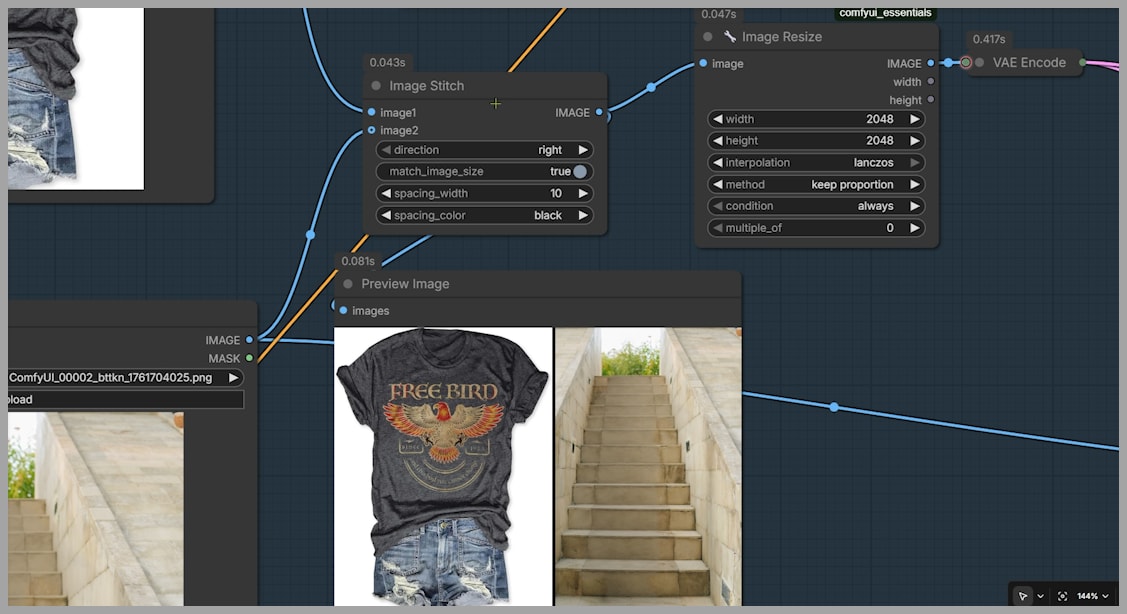
This can also be used to combine reference images before sending them into the workflow.
For example, in another test, three reference images are used with this prompt:
woman wearing t shirt and shorts, standing on a short staircase
Two images are stitched together using ComfyUI’s standard Image Stitch node. The Ref Grid node is also included for comparison.
When comparing the outputs, the image created with the built-in Image Stitch node appears to have better face consistency.
This suggests an important point:
If you are only stitching two images, you may not need Flux Klein Ref Grid.
The standard Image Stitch node may be enough, and in some cases, it may even preserve identity better.
When to Use Flux Klein Ref Grid
Use Flux Klein Ref Grid when you are working with several references and Flux 2 Klein starts producing unstable results.
It is especially useful when:
- You are using multiple clothing, pose, accessory, or background references.
- Flux 2 Klein is producing anatomy errors.
- The output looks chaotic or visually confused.
- You want to reduce the number of separate reference inputs.
- You want a structured 2×2 reference grid.
- You are combining many elements and need a more controlled reference layout.
The Ref Grid node is particularly helpful when direct multi-reference input causes obvious mistakes.
When to Use the Built-In Image Stitch Node
Use ComfyUI’s built-in Image Stitch node when your reference setup is simpler.
It may be a better option when:
- You only need to stitch two images.
- Face consistency is the top priority.
- You do not need a 2×2 normalized grid.
- You want a simpler workflow without installing a custom node.
- The custom Ref Grid node changes the background or identity too much.
For simple two-image combinations, Image Stitch is definitely worth testing before reaching for a custom solution.
Practical Workflow Tips
Here are some practical recommendations based on the tests.
1. Keep the Most Important Reference Separate
If one image matters most, such as the main portrait or identity reference, keep it separate when possible.
This helps the model understand which reference should carry the most weight.
2. Stitch Supporting References Together
Use Ref Grid or Image Stitch for secondary references such as:
- Clothing
- Accessories
- Background
- Pose
- Style details
This can reduce the complexity of the workflow.
3. Test Different Reference Orders
The order of reference images can affect the result.
Try changing which image comes first and which images get stitched together. Sometimes a small change in reference arrangement can produce a much better output.
4. Do Not Assume Fewer Images Always Means Better Results
Three references can still fail. Five references can sometimes work.
The key is not only the number of images, but how compatible those images are and how the model interprets them.
5. Compare Multiple Outputs
Always generate comparisons.
Test:
- Direct multi-reference input
- Flux Klein Ref Grid
- Built-in Image Stitch
- Different reference orders
- Different stitched combinations
That is the fastest way to understand which setup works best for your specific prompt.
Final Thoughts: Ref Grid Is Helpful, but Not Magic
The Flux Klein Ref Grid node is a useful tool for improving multi-reference workflows in Flux 2 Klein.
It can stitch multiple images into a clean 2×2 grid, normalize each section into a fixed 1000×1000 tile, and help the model process several visual references as one structured image.
In many cases, this reduces major errors and improves the stability of the final output.
But it is not perfect.
Sometimes the face becomes less consistent. Sometimes the background changes. Sometimes the outfit improves, but another element drifts.
The biggest lesson is this:
Flux 2 Klein has its own logic for combining references. If your workflow works with that logic, you can get strong results. If it works against that logic, you may lose consistency or get strange outputs.
So treat Ref Grid as one more tool in your ComfyUI toolbox.
Use it when Flux 2 Klein struggles with multiple references. Compare it with the built-in Image Stitch node. Experiment with reference order. And most importantly, keep testing until you find the setup that gives you the cleanest, most consistent result.