Nano Banana Pro vs Flux 2 Pro – The ULTIMATE Text-to-Image & Editing Showdown
The landscape of AI image generation has been moving at breakneck speed. With new model releases like Flux 2, Nano Banana Pro, Z-Image, and continuous updates across the ecosystem, creators are constantly asking: Which model delivers the best value and best results?
This article dissects a comprehensive set of tests comparing two leading closed-source models inside ComfyUI:
- Flux 2 Pro
- Nano Banana Pro
Both models were evaluated using the ComfyUI API, ensuring consistent test conditions. For every prompt, three variations were generated, and the best output from each model was selected—mirroring how a professional creator might pick their final result.
If you rely on ComfyUI for professional artwork, product mockups, portraits, or challenging image editing workflows, this breakdown will help you decide which model delivers the reliability and quality you need.
YouTube Tutorial:
Gain exclusive access to advanced ComfyUI workflows and resources by joining our community now!
Skin Texture and Facial Details
Skin texture is often the first giveaway of model quality. Realistic pores, wrinkles, moisture, and micro-details indicate whether a model understands human surface material—or simply fakes it.
Side-by-Side Findings

Nano Banana Pro
- Consistently produces smoother, more lifelike skin detail
- Tears look translucent and wet rather than blob-like
- No strange noise lines or artifacts on the face
- Better texture reproduction on accessories like hats and headwear
Flux 2 Pro
- Occasional artifacts like thin black lines or unnatural streaks
- Tear renderings often look gelatinous
- Hat and clothing textures lack micro-detail clarity
- Hand anatomy can appear slightly distorted in close-ups
Why It Matters
Portrait artists, character designers, and photographers using AI know that poor skin rendering instantly breaks immersion. Banana’s superior micro-texture reproduction makes it a more reliable choice for beauty, fashion, and portraiture workflows.
Textures of Rocks and Grass
Natural textures test a model’s understanding of material realism and fine structural detail.
Performance Overview
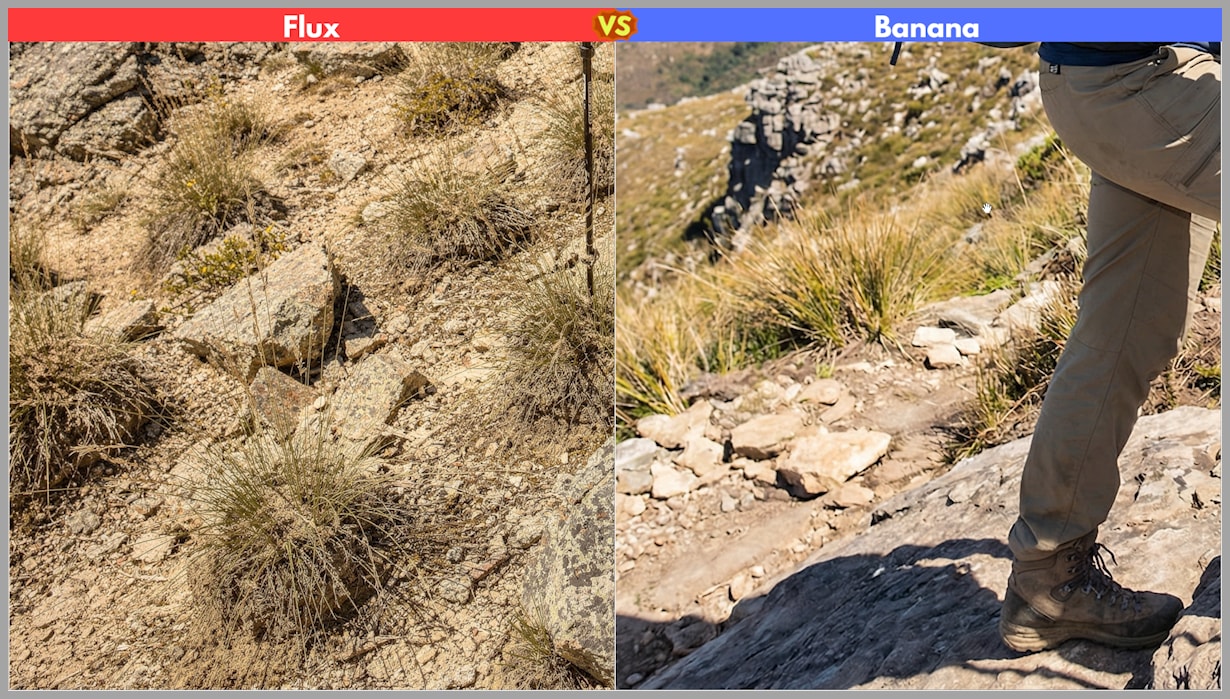
Nano Banana Pro
- Clear separation between rocks, dirt, moss, and grass
- Maintains mineral-like texture for rocks
- Preserves organic patterns in grass and foliage
- Accurately followed prompt details (e.g., sweat on collar)
Flux 2 Pro
- Tends to blend rock and grass textures, creating mushy details
- Missed sweat and moisture prompts
- Surfaces look less structured and more painterly
Why It Matters
If your project demands environmental realism, such as outdoor photography, fantasy world-building, or product staging in natural environments, Banana’s reliability becomes especially valuable.
Object Structure
Objects like keyboards, zippers, and mechanical parts test a model’s geometric precision.
Keyboard Test
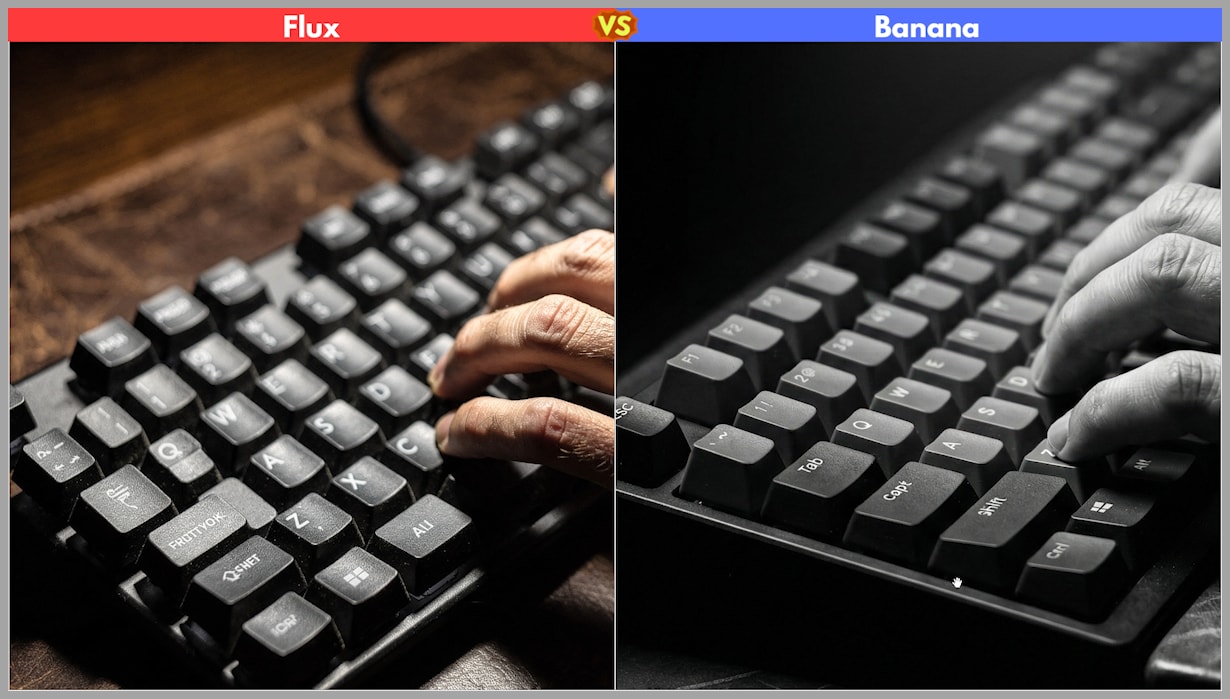
- Nano Banana Pro: Keys remain even, proportional, and properly spaced
- Flux 2 Pro: Keys vary in shape and size, breaking believability
Zipper Test
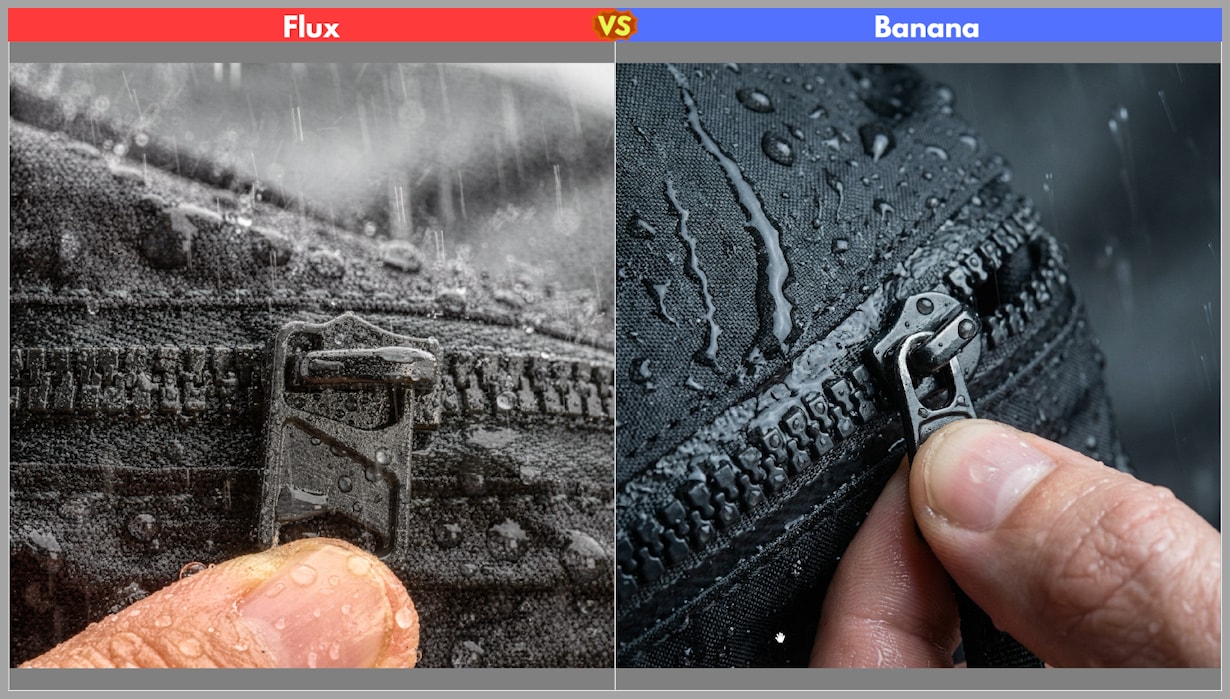
- Nano Banana Pro: Metal teeth look individually defined; pull tab is structurally sound
- Flux 2 Pro: Zipper appears melted into the fabric; shapes lack clarity
Why It Matters
Industrial designers, product mockup creators, and e-commerce content creators need sharp, geometrically accurate objects. Banana leads here by a large margin.
Human Poses
Human pose interpretation is a common fail-point for many models, especially in sports or dynamic-action contexts.
Results
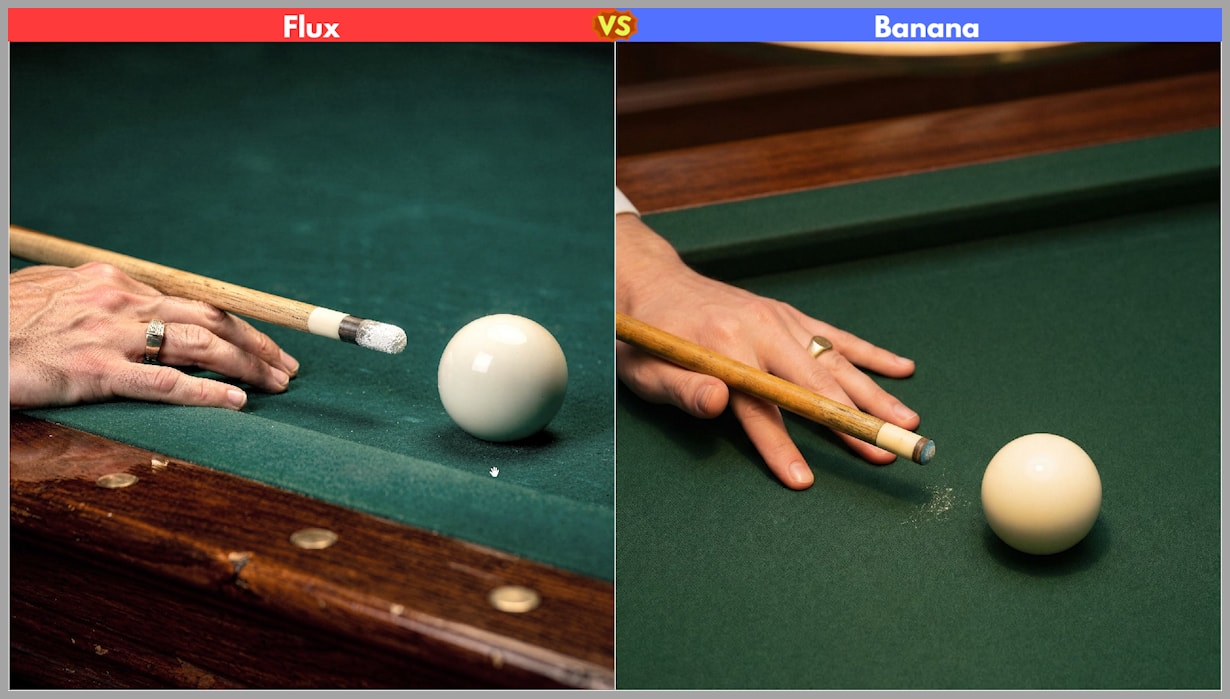
Nano Banana Pro
- 3/3 correct snooker-playing poses
- Hand, cue placement, and body alignment were accurate
Flux 2 Pro
- Only 1/3 images had proper pose accuracy
- Cue chalk effects were exaggerated or distorted
Why It Matters
Correct pose structure is essential for:
- Athletic photography
- Dance references
- Character art and motion studies
Banana provides greater reliability without requiring extensive prompt engineering.
Face Consistency
Face swapping was one of the clearest comparative categories.
Observations

Both models understood the core task, but they diverged in execution:
Nano Banana Pro
- Clean, precise face replacement
- Maintained original clothing and background
- Skin tone and facial traits remained faithful to reference
Flux 2 Pro
- Performed a face-and-outfit swap unintentionally
- Skin tones were uneven with subtle blotching
Why It Matters
Face consistency is crucial for:
- Family portraits
- Actor replacement
- Professional retouching
- Advertising with consistent brand models
Banana’s stability makes it a top choice for these workflows.
Multi-Person Consistency
This advanced test required maintaining three distinct identities in a group setting.
Results
Nano Banana Pro

- Strong identity preservation across all three faces
- Captured the emotional tone of “close friends”
- Faces look recognizable and cohesive
Flux 2 Pro
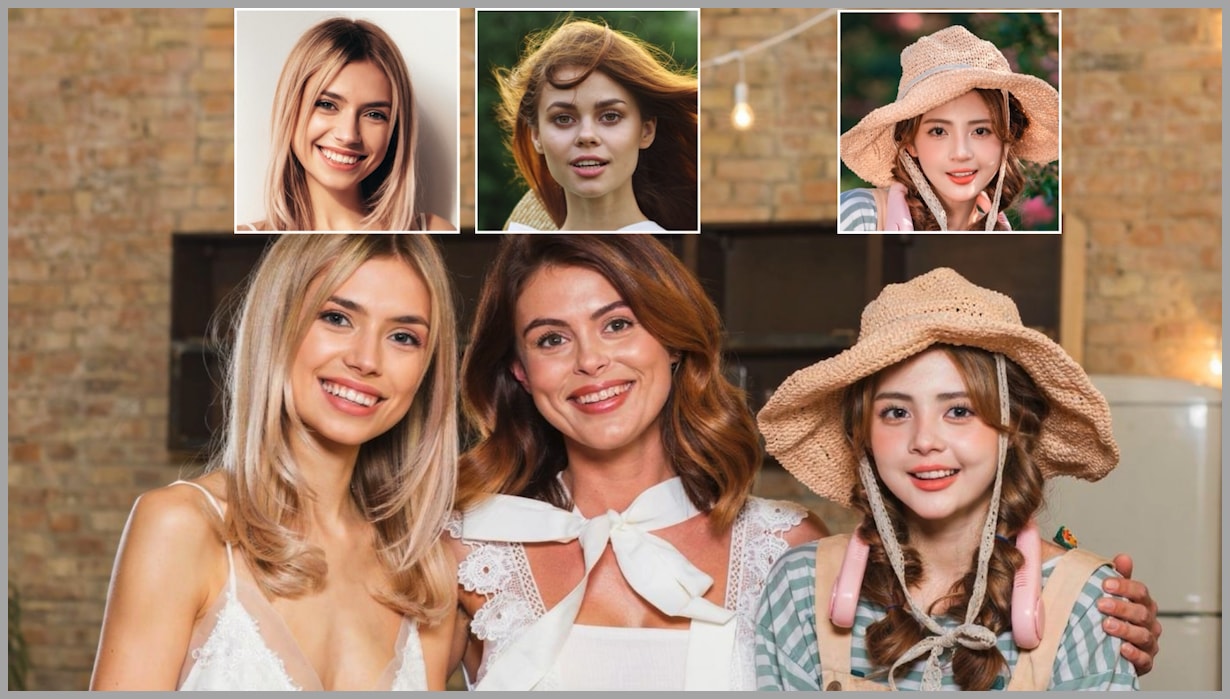
- Face drift occurs (especially middle person)
- Weaker alignment to reference identities
Why It Matters
If you’re generating group shots—family photos, team images, multi-character illustrations—Banana provides far more dependable accuracy.
Clothing Swap
Clothing swaps test fabric understanding, pattern alignment, and structural reasoning.
Scenario 1 — Logo Dress onto Cyclist
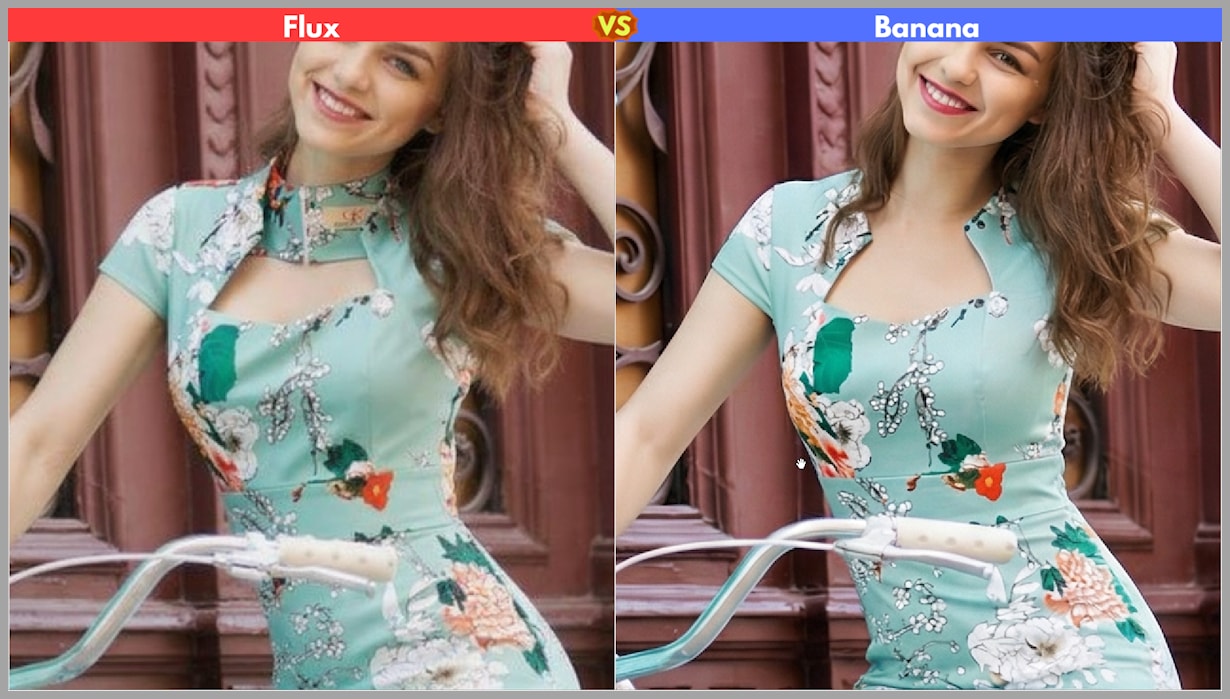
- Nano Banana Pro: Correctly recognized the fabric’s inner vs. outer layers
- Flux 2 Pro: Misinterpreted reverse-side stitching and included unwanted patterns
Scenario 2 — Indian Saree Swap
This was a deliberately difficult test due to complex patterns, embroidery, and layered fabrics.
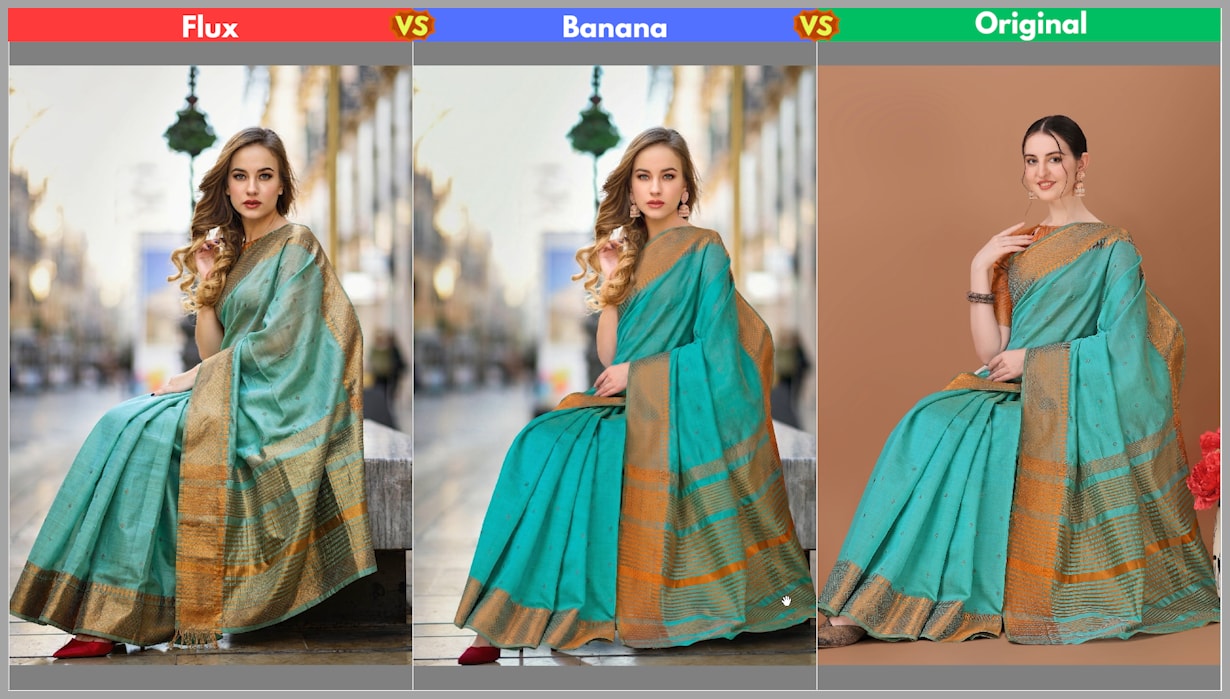
Nano Banana Pro
- Solid structural accuracy
- Slight loss of textile shine
- Overall better fidelity to original dress
Flux 2 Pro
- More dramatic lighting but inaccurate fabric features
- Added fictional fringe and omitted important elements
Why It Matters
Fashion creators, cosplay designers, and product advertisers need reliable fabric handling. Banana’s consistency makes it the better tool for textile-heavy workflows.
Text on Products & Logo Fidelity
Label fidelity is a classic test of AI weaknesses.

Results
Both models handled label transfer surprisingly well, but:
- Nano Banana Pro produced sharper, more readable text
- Flux 2 Pro had slight blurring on fine print
Why It Matters
Clear logos are essential for:
- Product marketing
- Cosmetic packaging
- Brand presentations
Banana is the safer option when accuracy matters.
Pose Transfer
Using a reference pose, models were asked to recreate a ballet stance.

Outcomes
- Flux 2 Pro surprisingly matched the pose more accurately
- Using a pencil sketch further improved Flux’s consistency
- Nano Banana Pro delivered aesthetically pleasing results, but with mild pose drift
Why It Matters
If your work frequently relies on sketch → pose workflows (e.g., character design, figure drawing), Flux has an unexpected advantage in this specific scenario.
Applying the Lighting Effects
Lighting transfer is notoriously challenging, especially for maintaining facial detail.
Results
Nano Banana Pro

- Minor quality loss
- Maintained strong detail and surface quality
- No major artifacts
Flux 2 Pro

- Noticeable quality drop
- Vertical wall stripes and noise artifacts
- Loss of facial sharpness
Why It Matters
Lighting control is essential for:
- Cinematic scenes
- Product glam shots
- Stylized portraits
Banana remains the more dependable model for relighting workflows.
Summary
After testing text-to-image generation, object accuracy, pose handling, lighting transfer, multi-face consistency, and detailed editing tasks, the results are clear:
Nano Banana Pro is the superior model in nearly every category.
Cost Comparison
- Nano Banana Pro: ~14¢ per image
- Flux 2 Pro: ~4.5¢ per image
Flux 2 Pro remains an excellent budget-friendly option. For high-volume workflows or prototyping, Flux is a solid pick. But for premium, client-ready deliverables, Nano Banana Pro typically provides the sharper and more realistic result.
The Bigger Picture
Closed-source models aren’t the only contenders. As noted in earlier articles:
- Qwen Edit (open-source) can outperform both models in face swapping & relighting.
- Several emerging open models are catching up fast.
Future blog posts will showcase open-source workflows in ComfyUI that can rival or surpass these premium models—without the pay-per-image costs.
Gain exclusive access to advanced ComfyUI workflows and resources by joining our community now!