Krea 2 vs. Flux 2 Klein for Image Editing in ComfyUI: Workflow Setup and Side-by-Side Comparison
Krea 2 has become a very popular text-to-image model, but its capabilities are not limited to image generation. With the help of a suitable LoRA and a few custom nodes, Krea 2 can also be turned into a capable image-editing model inside ComfyUI.
That raises an obvious question:
How does Krea 2 compare with Flux 2 Klein for image editing?
I had exactly the same question, so I built a dedicated ComfyUI workflow to test the two models under the same conditions. In this article, I’ll walk through the workflow, explain the key nodes behind both editing pipelines, and compare the two models across a range of single-image and multi-image editing tasks.
The goal is not simply to declare one model the winner. Instead, we’ll look at where each model performs well, where it struggles, and which one may be the better choice for different types of editing work.
YouTube Tutorial:
1. Why Compare Krea 2 and Flux 2 Klein?
Krea 2 is primarily known as a text-to-image model. However, by combining it with an image-editing LoRA and the appropriate conditioning nodes, we can make the model respond to source images as well as text prompts.
Flux 2 Klein, on the other hand, already has a strong reputation for flexible image editing and multi-image conditioning.
Because both models can be used for similar editing tasks, it makes sense to compare them directly.
In this test, I wanted to answer several practical questions:
- Which model understands editing instructions more accurately?
- Which model preserves the original subject better?
- Which model performs better when several reference images are involved?
- How well do they handle pose changes, object interaction, background replacement, clothes swapping, and face replacement?
- Are there specific situations where Krea 2 can outperform Flux 2 Klein?
To make the comparison as fair as possible, both models use the same prompts and the same reference images whenever possible.
2. Workflow Overview
The overall workflow is divided into two main sections.
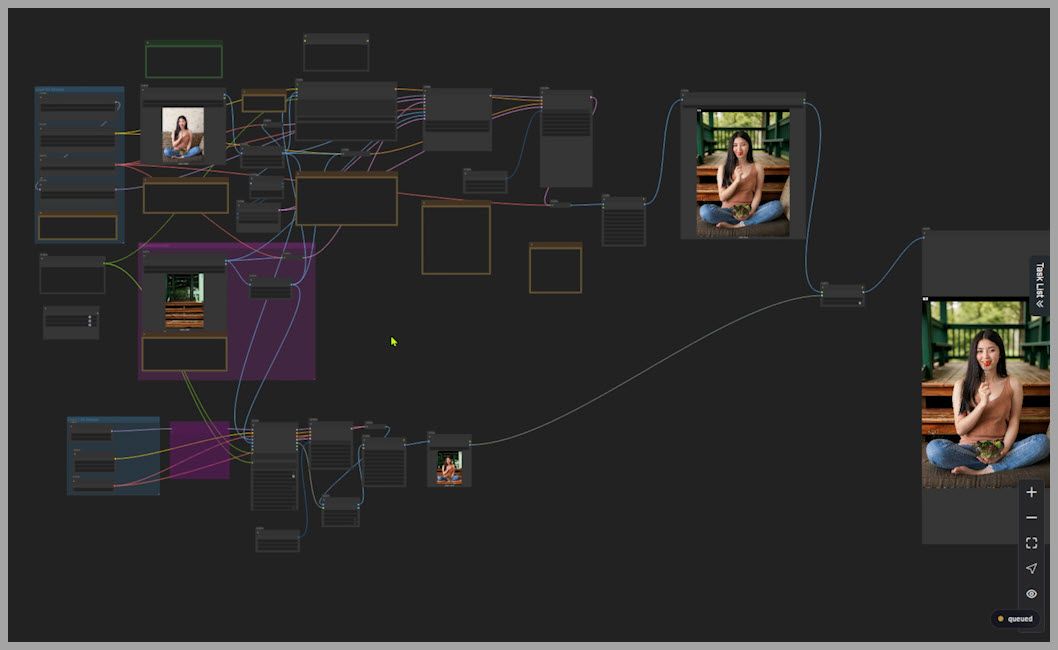
2.1 Upper Section: Krea 2 Turbo Editing
The upper part of the workflow contains more nodes and handles image editing with the Krea 2 Turbo model.
This branch requires additional processing because Krea 2 needs specific nodes to make it properly aware of both the prompt and the source image.
The two most important nodes are:
- Krea 2 Edit Grounded Encode
- Krea 2 Edit Source Patch
We will examine both of them in detail shortly.
2.2 Lower Section: Flux 2 Klein 9B Editing
The lower part of the workflow is simpler.
It handles image editing with the Flux 2 Klein 9B model.
For this branch, I use a node called:
NKD Klein Presampling
This node collects the model, prompt, and reference images, then prepares everything before sending it to the sampler.
Compared with the Krea 2 branch, the overall node structure is noticeably more compact.
2.3 Side-by-Side Output Comparison
At the end of the workflow, both generated images are displayed side by side.
For each test:
- The left image is the original uploaded image.
- The middle image is generated by Krea 2.
- The right image is generated by Flux 2 Klein.
This layout makes it much easier to identify differences in:
- Subject preservation
- Prompt understanding
- Anatomy
- Composition
- Pose
- Background replacement
- Reference-image fidelity
3. How the Krea 2 Image Editing Workflow Works
The Krea 2 editing branch relies heavily on two custom nodes.
Understanding these nodes is important because they explain why Krea 2 can perform image editing even though it is commonly used as a text-to-image model.
3.1 Krea 2 Edit Grounded Encode
The first important node is:
Krea 2 Edit Grounded Encode
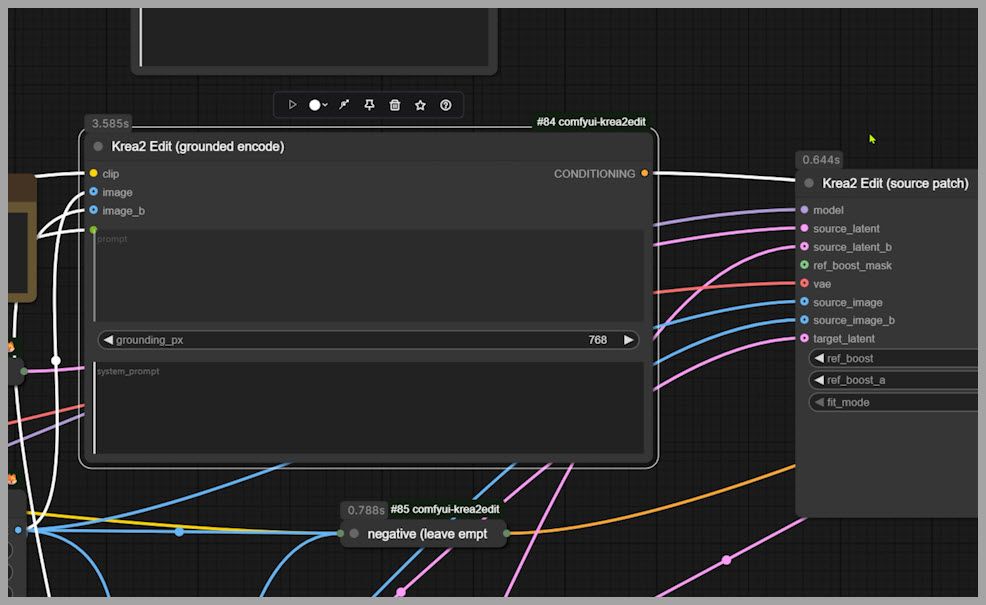
At first glance, this node looks somewhat similar to a normal CLIP Text Encode node.
In a standard ComfyUI workflow, a CLIP Text Encode node receives your prompt and converts the text into conditioning information that the model can understand.
In simplified terms, the process looks like this:
- You enter a text prompt.
- CLIP interprets the meaning of that text.
- The prompt is converted into conditioning.
- The diffusion model uses that conditioning to guide image generation.
The Krea 2 Edit Grounded Encode node does something more advanced.
It can receive images as inputs in addition to text.
That means the conditioning process can become aware of the actual visual content of your reference image.
Instead of only knowing:
“Change the woman’s dress.”
the model can also understand what the woman currently looks like, where she is located, how she is posed, and what visual elements already exist in the image.
This is an important part of turning Krea 2 into an image-editing model.
3.2 Why Image-Aware Encoding Matters
For image editing, text alone is often not enough.
Imagine that you ask a model:
Change the woman’s outfit to a floral dress.
If the model only receives the prompt, it does not necessarily know which woman you are talking about or what visual structure needs to be preserved.
By passing the image into the encoding process, the model gains additional context about:
- The subject
- The existing pose
- The scene
- Clothing
- Facial appearance
- Composition
- Lighting
- Spatial relationships
That gives it a much better chance of making a localized edit rather than generating an unrelated image from scratch.
3.3 The Two-Image Limitation
There is one important limitation.
The Krea 2 Edit Grounded Encode node only supports a maximum of two image inputs.
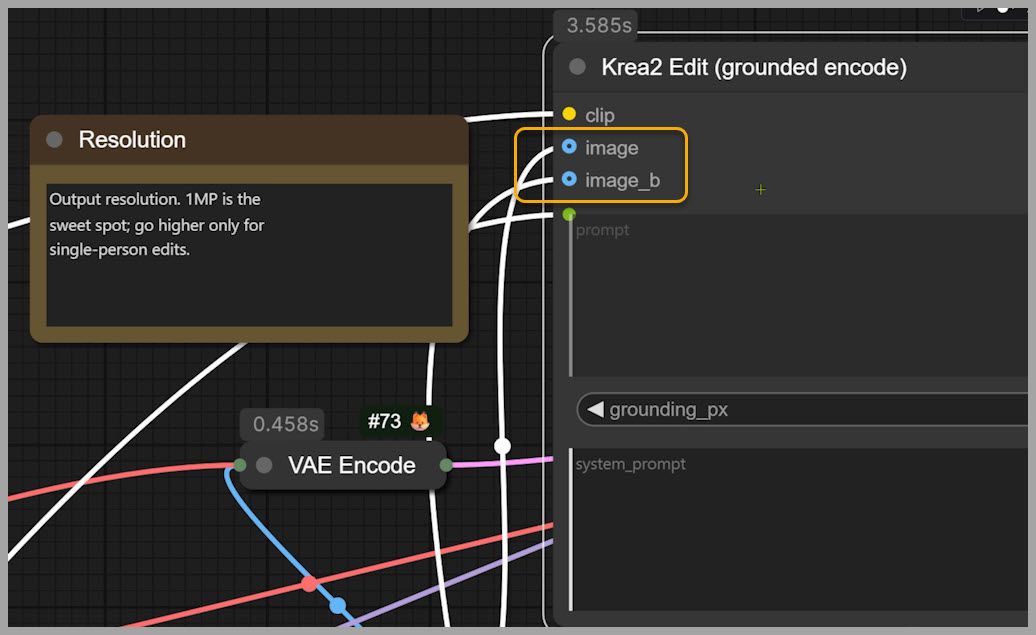
For basic image editing, this is usually enough.
For example, you could use:
- Image 1 as the original source image
- Image 2 as a clothing, face, or background reference
However, the limitation becomes more noticeable when you want to build complex multi-reference workflows.
For example, imagine using separate images for:
- The original person
- A face reference
- A clothing reference
- A pose reference
- A background reference
Krea 2’s grounded encode node cannot conveniently accept all of these at once.
If your workflow requires several reference images, Flux 2 Klein may therefore be easier to work with.
4. Krea 2 Edit Source Patch
The second core node is:
Krea 2 Edit Source Patch
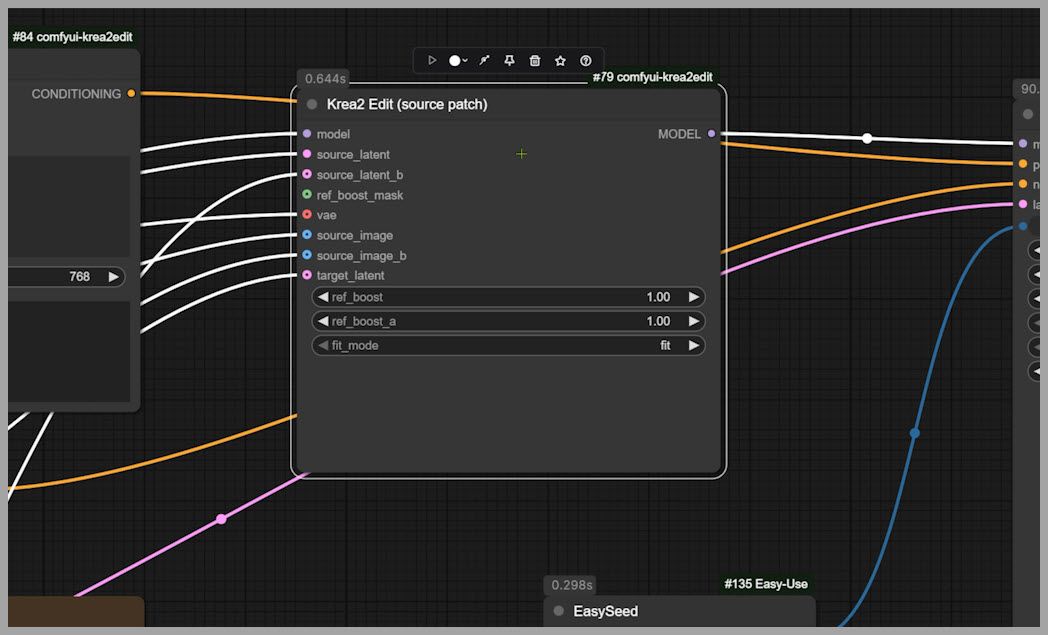
This node modifies—or patches—the Krea 2 model so that it can directly reference the original source image during generation.
This is extremely important.
Without this mechanism, the model would depend much more heavily on prompt conditioning and might drift too far away from the original image.
With the source patch, the model can effectively keep looking back at the source while generating the edited result.
That helps it preserve important visual information such as:
- Identity
- Composition
- Pose
- Scene layout
- Original object placement
- Structural details
In other words, Krea 2 is not simply being told what the source image contains. The patched model can use the source image directly as part of the editing process.
4.1 Source Patch Parameters
The Krea 2 Edit Source Patch node includes several adjustable parameters.
These controls can influence how strongly the source image affects the final generation and how the model balances preservation against transformation.
Rather than trying to compress every parameter explanation into this article, the workflow includes a Markdown node containing notes from the custom-node author.
If you download the workflow, I recommend reading that Markdown section carefully before changing the parameters.
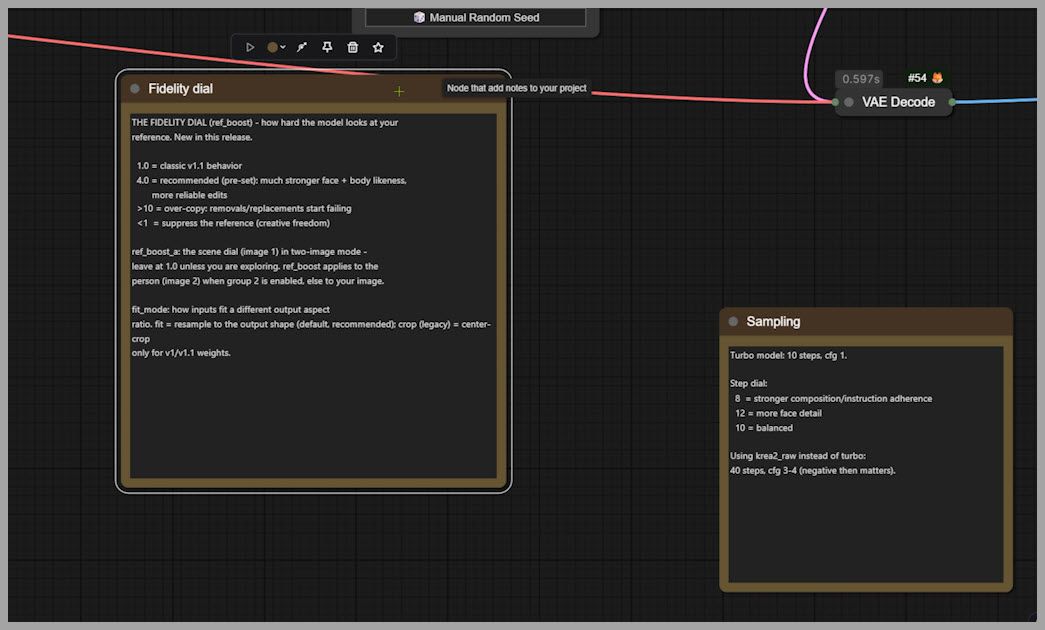
It provides useful explanations of what the settings do and gives you a better foundation for tuning Krea 2 editing behavior.
5. How the Flux 2 Klein Workflow Works
The Flux 2 Klein branch is more straightforward.
The key node used in this workflow is:
NKD Klein Presampling
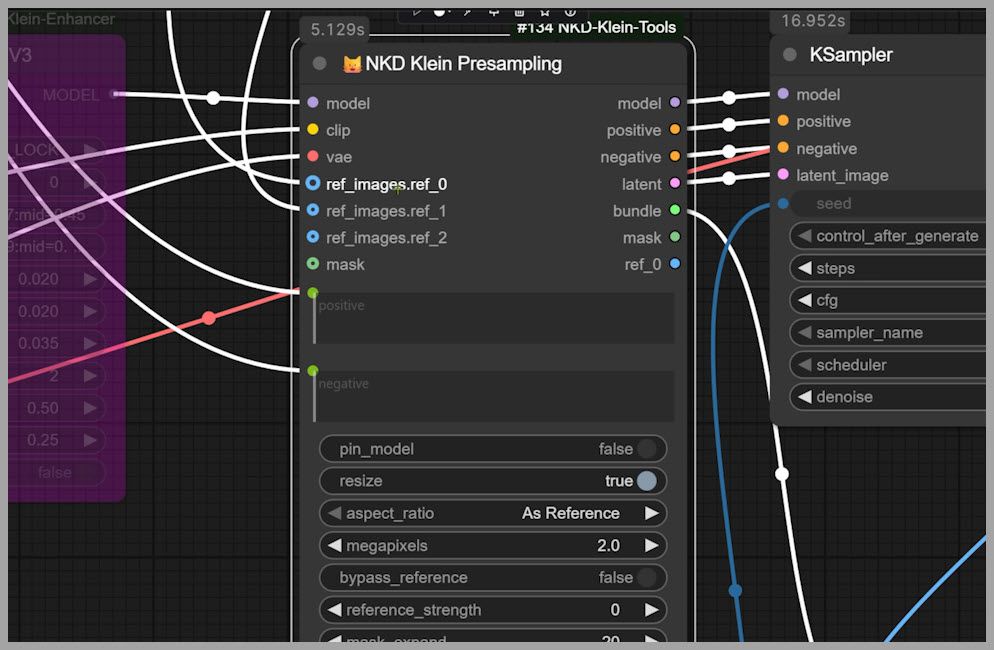
This node acts as a central collection point.
You connect:
- The Flux 2 Klein model
- Your prompt
- Your reference images
The node then gathers all of that information and passes the prepared data directly toward the sampling stage.
This makes the workflow easier to understand and reduces the number of individual nodes that need to be managed.
5.1 Flexible Multi-Image Inputs
One of the strongest advantages of NKD Klein Presampling is its flexible reference-image system.
When you connect an image, another image input slot automatically appears.
You can continue adding more references as needed.
In this workflow, the node supports as many as eight image inputs.
That is a major advantage over the two-image limitation in the Krea 2 grounded encode node.
For multi-reference editing, Flux 2 Klein can therefore be much more convenient.
You could theoretically provide separate references for:
- Identity
- Hairstyle
- Clothing
- Pose
- Background
- Product
- Color palette
- Composition
without needing to redesign the workflow around a strict two-image limit.
5.2 Additional Flux 2 Klein Editing Control
There is also another helpful Flux 2 Klein node that can provide more detailed and creative control during image editing.
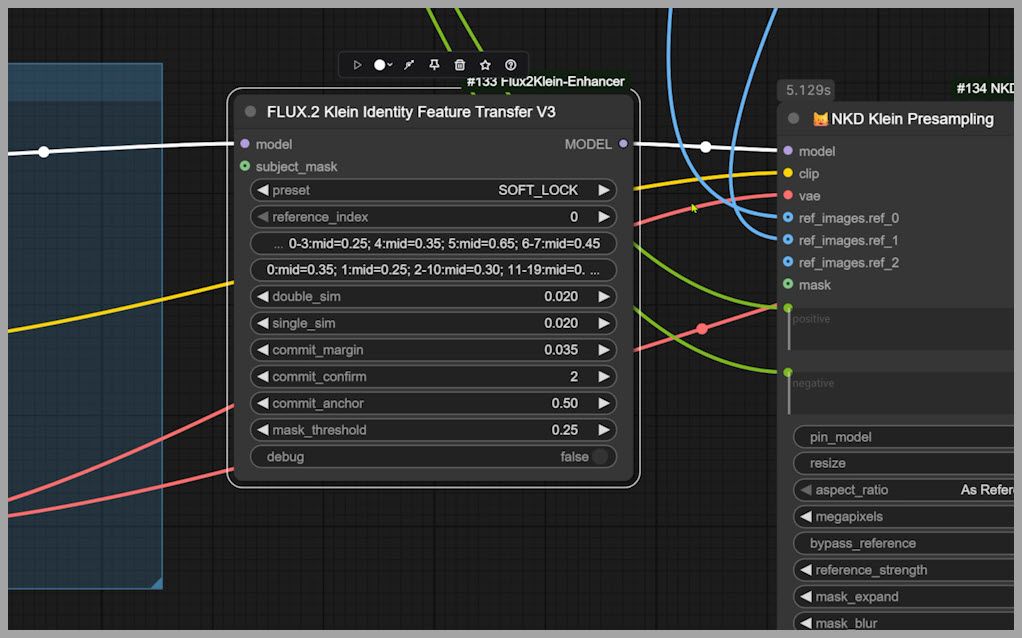
I covered that node in a previous article, so I will not repeat the full explanation here.
If you are planning to use Flux 2 Klein extensively, it is worth learning those additional controls because they can give you more flexibility over how the model interprets and applies reference information.
6. Switching Between Single-Image and Multi-Image Editing
The workflow can operate in both single-image and multi-image modes.
This allows us to compare the models across several types of editing without rebuilding the graph.
6.1 Multi-Image Mode
For multi-image tests, both Krea 2 and Flux 2 Klein receive the same two input images.
For example:
- Image 1 may contain the original woman.
- Image 2 may contain a face, dress, or background reference.
Using identical inputs helps keep the comparison fair.
6.2 Single-Image Mode
There is also a group of nodes associated with the second image.
If we bypass that group, the workflow only uses one image.
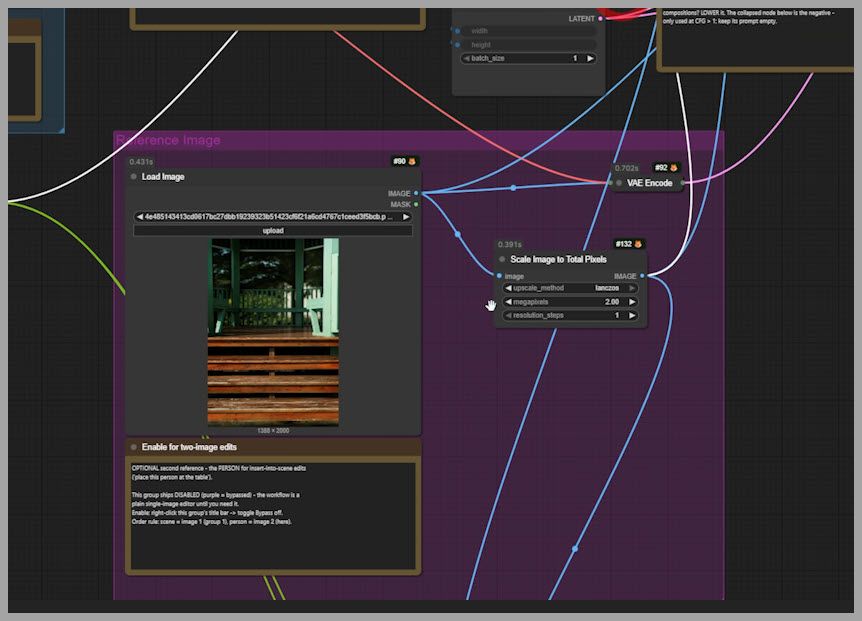
That effectively switches the workflow into single-image editing mode.
This is useful for tasks such as:
- Removing an object
- Changing clothing through text
- Altering the background through text
- Changing a pose
- Changing the camera angle
Now that the workflow is clear, we can move on to the actual model comparison.
Part I: Single-Image Editing
7. Test 1: Removing a Fork and Cherry Tomato
Our first task is a fairly common image-editing request.
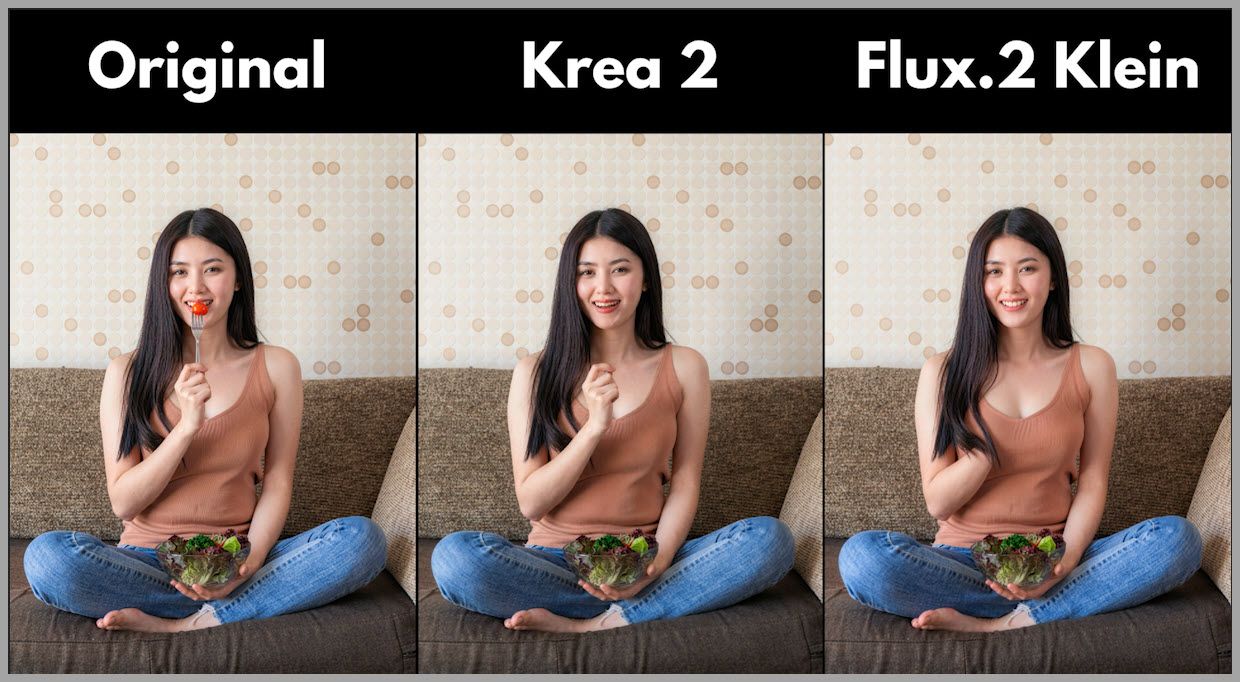
The original image contains a woman holding a fork and a cherry tomato.
The instruction is to remove both objects while keeping the rest of the image visually coherent.
This may sound simple, but it requires the model to reconstruct whatever was previously hidden behind the removed objects.
In particular, the model needs to correctly rebuild the woman’s hand.
7.1 Krea 2 Result
To my surprise, Krea 2 performed noticeably better on the hand reconstruction.
It removed the fork and cherry tomato and generated a reasonably convincing hand in their place.
This is important because hands are one of the most difficult parts of human anatomy for generative models.
Removing an object from a hand requires more than deleting pixels. The model has to infer:
- Finger position
- Palm structure
- Natural hand posture
- Skin continuity
- Lighting
- Occlusion
In this particular test, Krea 2 handled that reconstruction quite well.
7.2 Flux 2 Klein Result
Flux 2 Klein did not perform as well here.
It struggled to render the woman’s hand correctly after removing the objects.
So in terms of the primary editing objective, Krea 2 clearly had the advantage.
However, things became more interesting when I examined the woman’s face.
7.3 Facial Detail Comparison
When zooming in on the face, Krea 2 showed a noticeable problem.
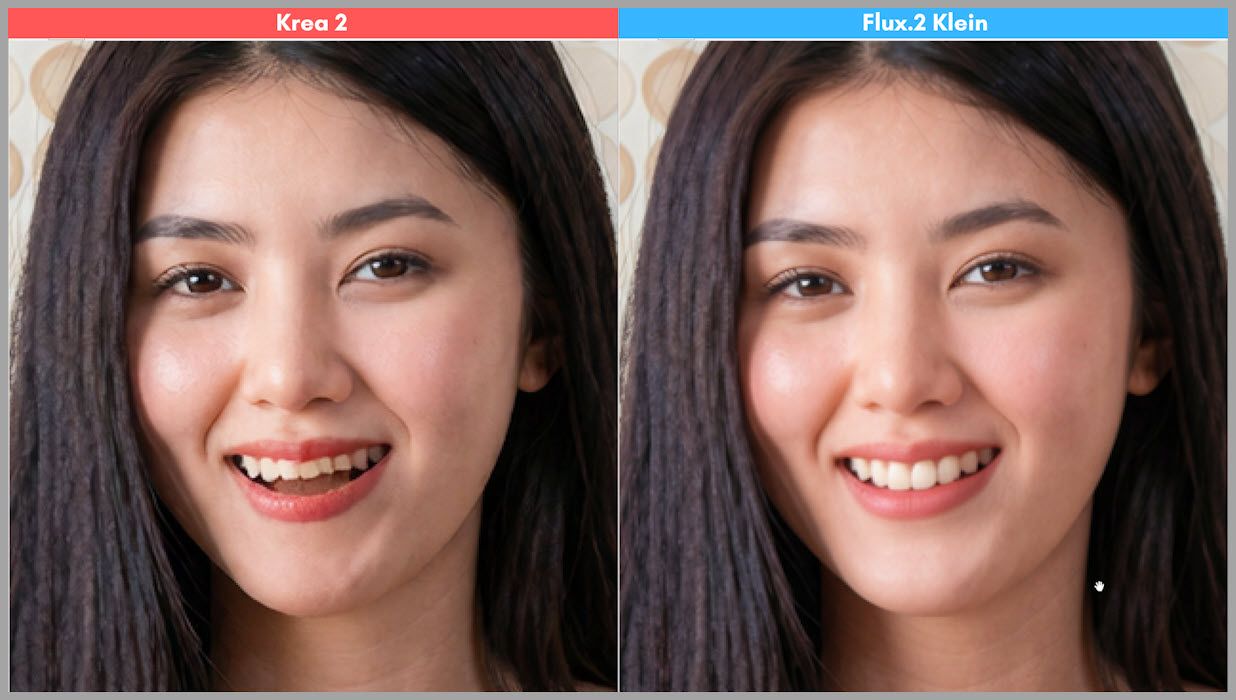
The woman’s teeth became slightly misaligned and visually flawed.
Flux 2 Klein, meanwhile, produced much cleaner teeth.
They looked:
- Straighter
- Better aligned
- More natural
So even though Flux 2 Klein failed on the hand, it preserved this particular facial feature more successfully.
7.4 Takeaway
This first test already shows why it is difficult to name one universal winner.
Krea 2 was better at:
- Removing the object
- Reconstructing the hand
Flux 2 Klein was better at:
- Preserving the teeth
- Maintaining cleaner facial detail
A successful edit therefore needs to be judged across the entire image rather than only by whether the requested object disappeared.
8. Test 2: Changing the Outfit to a Floral Dress
The second task is simpler.
This time, the instruction is to change the woman’s existing outfit into a floral dress.
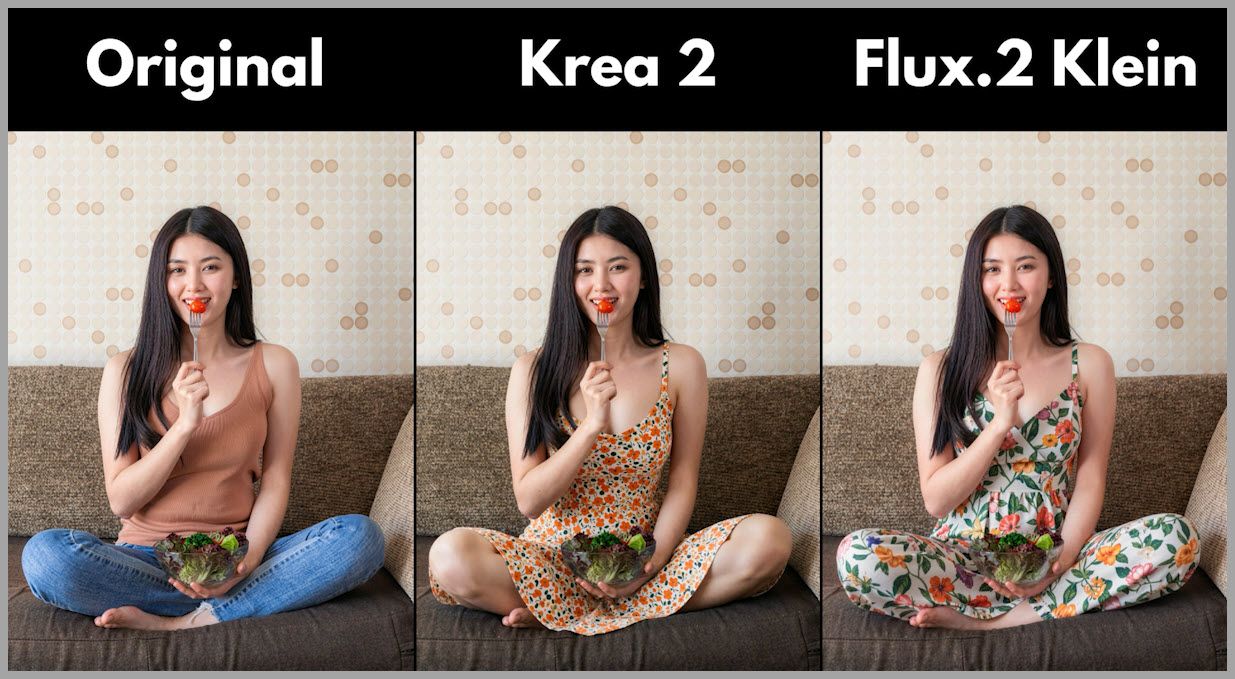
The model needs to modify the clothing while preserving as much of the following as possible:
- Identity
- Pose
- Body proportions
- Background
- Lighting
- Overall composition
8.1 Krea 2 Result
Krea 2 successfully changed the outfit.
The floral dress looked visually convincing and integrated naturally with the image.
8.2 Flux 2 Klein Result
Flux 2 Klein also completed the task successfully.
Its result looked good and remained consistent with the original subject and scene.
8.3 Takeaway
For this relatively straightforward clothing transformation, both models performed well.
Neither result showed an obvious enough failure to make the comparison particularly dramatic.
This suggests that simple text-guided outfit changes are well within the capabilities of both models.
The real differences begin to appear when the edit requires more complicated spatial reasoning.
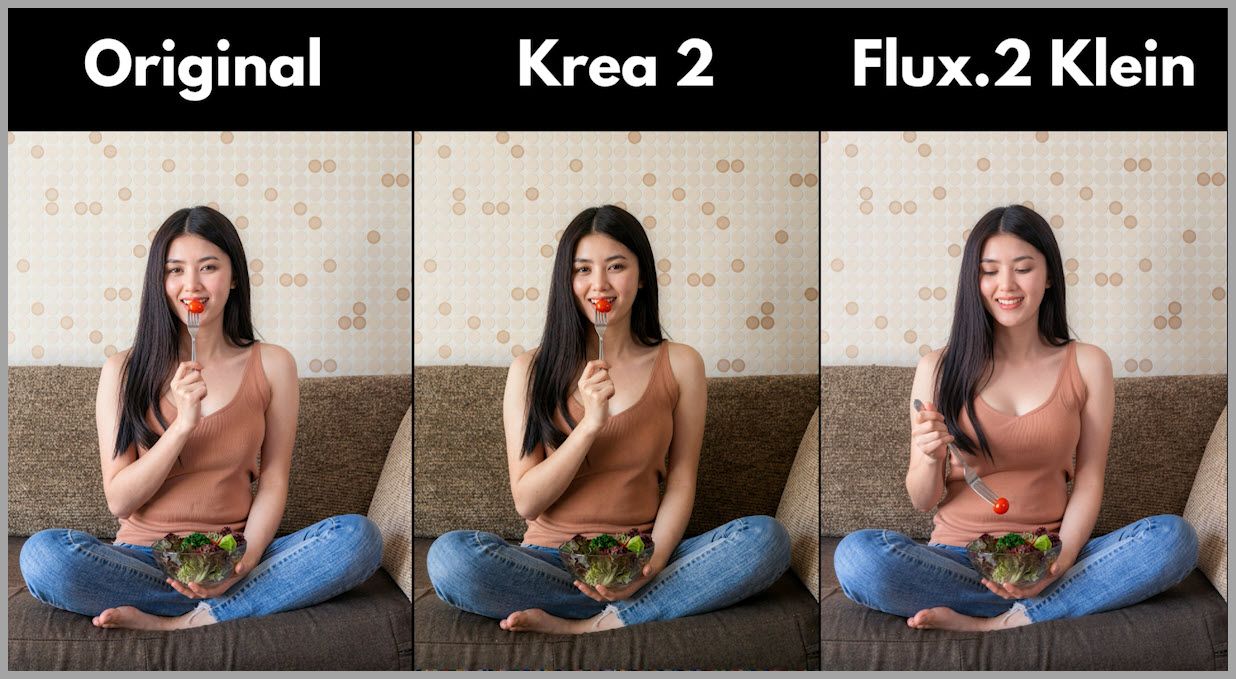
9. Test 3: Making the Woman Pick Up a Cherry Tomato
For the next test, I increased the difficulty.
Instead of simply changing an object or texture, I asked the model to create an interaction:
Make the woman use a fork to pick up a cherry tomato directly from the salad bowl.
This requires a much deeper understanding of the image.
The model must understand:
- Where the fork is
- Where the woman’s hand should move
- Where the salad bowl is located
- Where the tomato should be
- How the fork should interact with the tomato
- How the arm and hand should be repositioned
This is not just appearance editing. It is a small scene-level action.
9.1 Krea 2 Result
Krea 2 seemed confused by the instruction.
Instead of performing the requested interaction, it essentially left the image unchanged.
In other words, the model appeared to understand that the original image should be preserved, but it did not successfully translate the prompt into the required action.
9.2 Flux 2 Klein Result
Flux 2 Klein performed much better.
It correctly understood the relationship between:
- The woman
- The fork
- The cherry tomato
- The salad bowl
and produced the requested interaction.
The woman appeared to actually use the fork to pick up the tomato from the bowl.
9.3 Why This Matters
This test reveals an important distinction between local editing and semantic interaction editing.
Changing:
a blue dress into a red dress
is relatively simple because the model mainly modifies visual appearance.
Changing:
a person so that she uses a fork to pick up a specific object from a specific container
requires spatial reasoning and action understanding.
In this test, Flux 2 Klein showed a clear advantage.
10. Test 4: Background Replacement
Next, I tested one of the most common AI image-editing tasks:
changing the background.
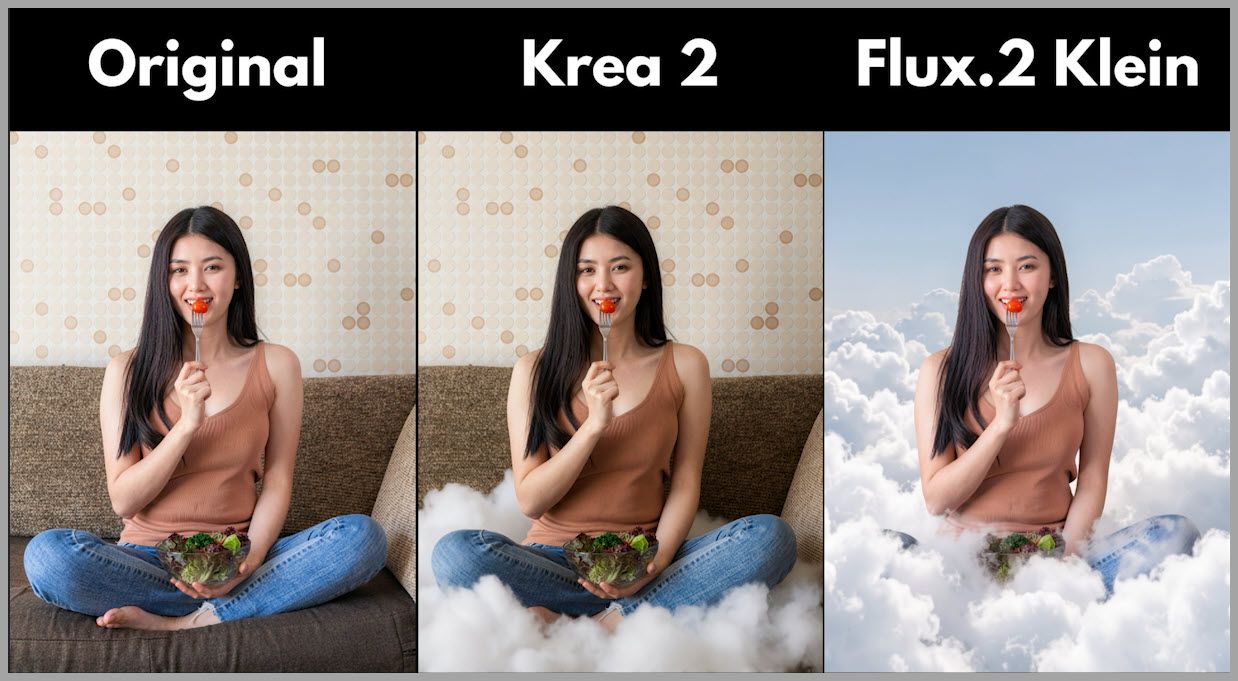
The instruction was to replace the existing indoor environment with a scene in the clouds.
The challenge here is that the model needs to make a large-scale transformation while still keeping the woman visually consistent.
10.1 Flux 2 Klein Result
Flux 2 Klein handled the request very well.
The woman appears to be genuinely sitting in the clouds.
The surrounding environment was transformed enough that the new setting feels intentional rather than partially edited.
This gives the final image a more coherent appearance.
10.2 Krea 2 Result
Krea 2 did not fully replace the original environment.
Instead, it generated several clouds while leaving the woman sitting on the original sofa.
The result looks strange because the image mixes two incompatible environments:
- The original indoor sofa
- The newly generated clouds
Rather than creating a complete environmental replacement, Krea 2 performed something closer to an overlay.
10.3 Takeaway
For this particular background replacement test, Flux 2 Klein showed much stronger scene-level understanding.
It understood that:
“Put her in the clouds”
means the original environment needs to be transformed, not simply supplemented with a few cloud elements.
This is a useful distinction when choosing a model for major scene edits.
11. Test 5: Changing the Camera Angle
The final single-image test is one of the most difficult.
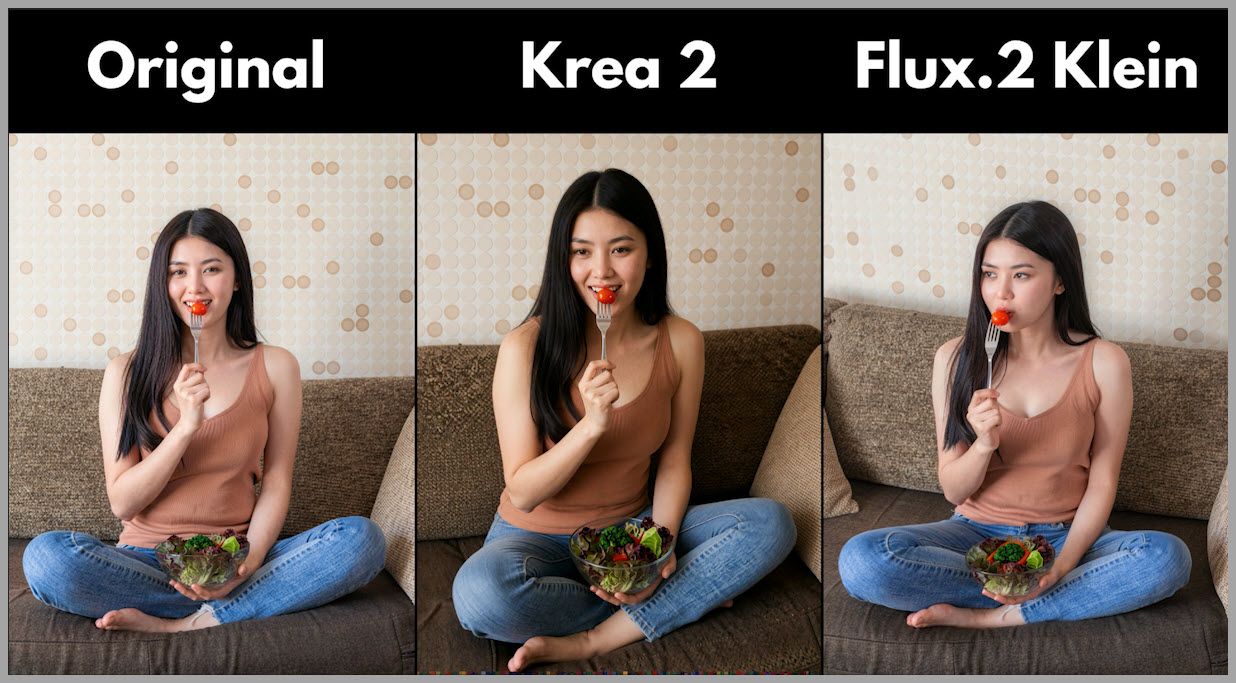
This time, I asked the model to transform the camera perspective into:
a front-right three-quarter view from a slightly elevated position.
This is substantially harder than changing clothing or removing an object.
11.1 Why Camera-Angle Changes Are Difficult
When you ask a generative model to change the viewpoint, it needs to infer visual information that may not exist in the original image.
For example, it may need to reconstruct:
- The side of the face
- Body geometry
- Clothing from a new perspective
- Parts of the background previously hidden
- Depth relationships
- Lighting from the new orientation
Effectively, the model needs to imagine what the scene would have looked like if the photographer had moved.
That makes camera-angle editing a very strong test of spatial understanding.
11.2 Krea 2 with the Identity Edit LoRA
To my surprise, Krea 2 handled this request successfully.
A major reason is the addition of the Identity Edit LoRA.
With this LoRA included in the setup, Krea 2 was able to understand the requested viewpoint and generate a convincing camera-angle transformation.
This is one of the most interesting results from the entire comparison.
Although Krea 2 struggled with some semantic editing tasks, it showed that it can handle substantial geometric transformations when supported by the right LoRA.
11.3 What This Reveals
Krea 2 should not be judged only by its weaker results in background or interaction editing.
When the workflow is configured correctly, it can perform difficult perspective changes surprisingly well.
This is also an important reminder that model performance depends not only on the base model, but on the surrounding workflow.
Factors such as:
- LoRA choice
- Conditioning method
- Node configuration
- Prompt structure
- Source-image strength
can have a major effect on the final result.
Part II: Multi-Image Editing
Now that we have tested several single-image editing tasks, let’s move on to multi-image editing.
In these examples, the workflow receives a second reference image that provides visual information for the requested transformation.
12. Test 6: Face Swapping
The first multi-image test is a face replacement.
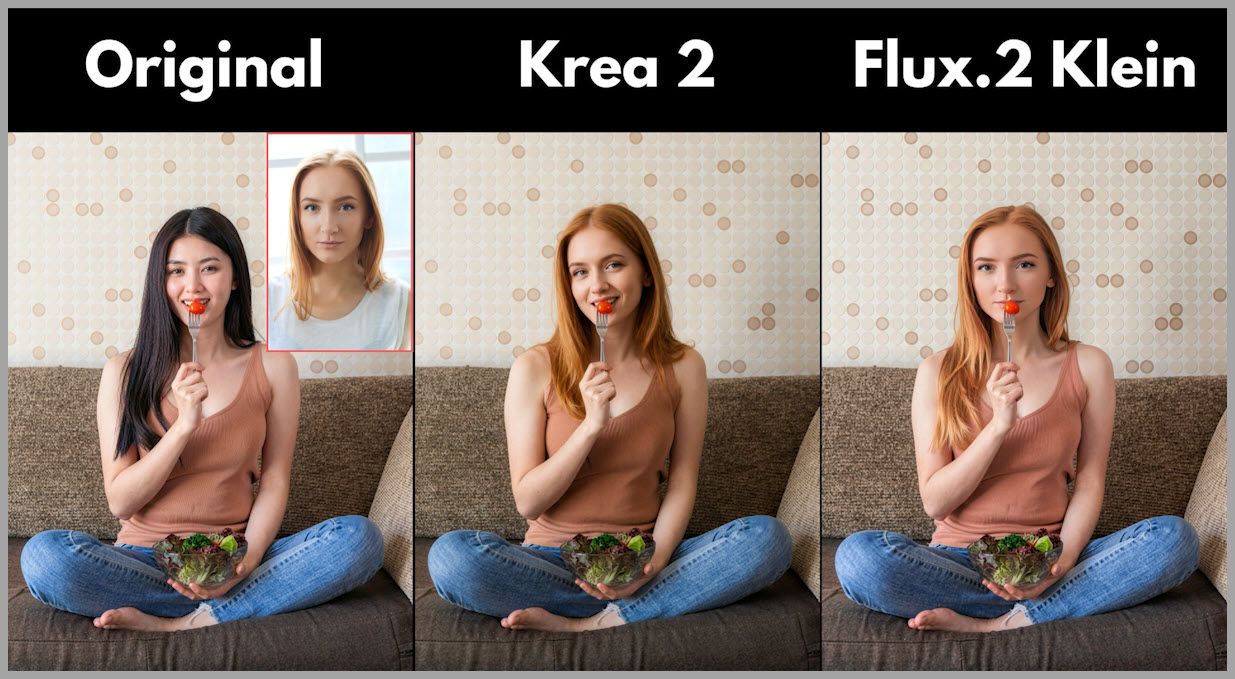
The second image is a simple portrait of a blonde woman.
The task is to transfer that identity onto the woman in the original image.
12.1 Flux 2 Klein Result
At first glance, Flux 2 Klein performs very well.
The generated face resembles the reference portrait more closely than the Krea 2 result.
Important facial characteristics are transferred more effectively, making the identity easier to recognize.
However, there is a significant problem.
The generated head is too large.
Its size is noticeably disproportionate to the woman’s body.
That makes the image look unnatural even though the facial similarity is strong.
12.2 Krea 2 Result
Krea 2 produces a more natural head-to-body ratio.
The head size feels much more consistent with the original person’s proportions.
However, the identity transfer is weaker.
The generated facial features do not match the reference portrait as closely as those produced by Flux 2 Klein.
12.3 The Tradeoff
The comparison therefore looks like this:
Flux 2 Klein
- Better facial similarity
- Worse head proportions
Krea 2
- Better head proportions
- Weaker facial similarity
Neither result is perfect.
12.4 Important Limitation of This Test
There is an important point to keep in mind.
This workflow is designed for general image editing.
It is not a dedicated face-swap workflow.
A specialized face-swapping pipeline can use additional techniques specifically designed for identity transfer and preservation.
I have previously created a dedicated Flux 2 Klein face-swap workflow that performs better for this kind of task.
A dedicated Krea 2 face-swap workflow can also be designed around Krea 2’s strengths rather than relying on this general-purpose comparison graph.
So this test should be interpreted as:
How well do the models handle face replacement inside a general editing workflow?
not:
What is the absolute maximum face-swap quality each model can achieve?
That distinction is important.
13. Test 7: Clothes Swapping with a Reference Dress
For the next multi-image test, I used an image of a beautiful red dress as the reference.
The goal is to transfer the dress onto the woman in the original image.
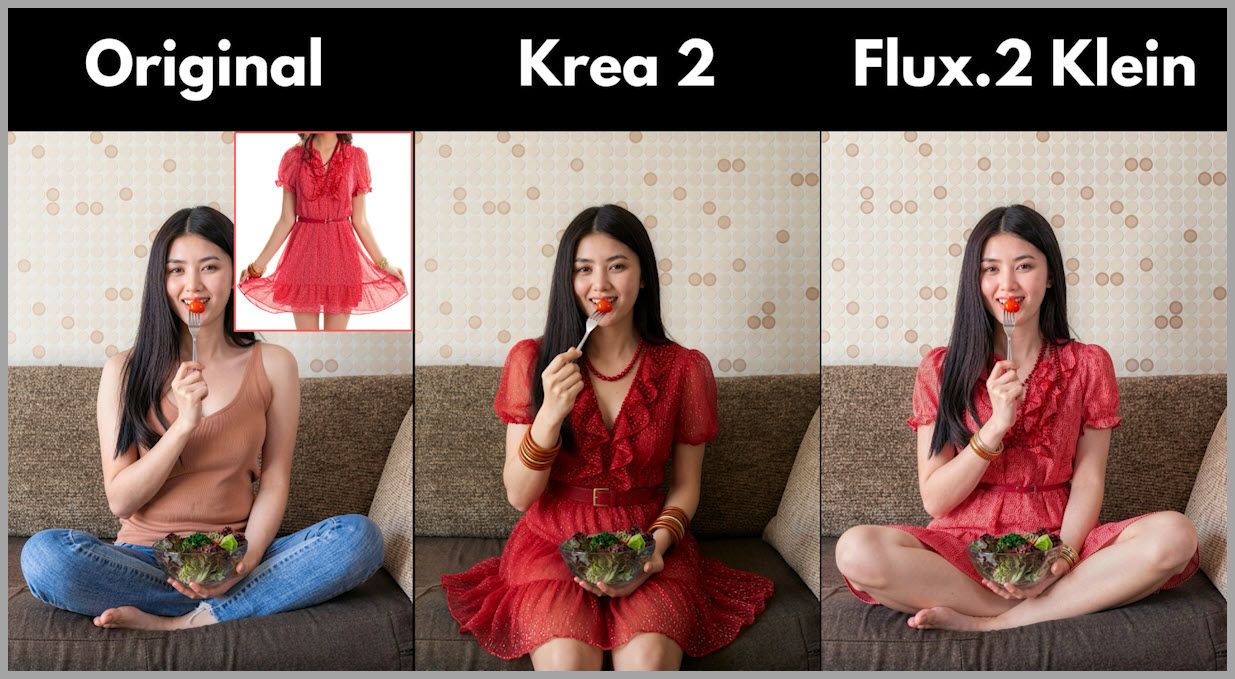
A good result should achieve two things simultaneously:
- Preserve the appearance of the reference dress.
- Preserve the woman’s original pose.
13.1 Flux 2 Klein Result
Flux 2 Klein performs very well.
The generated clothing remains visually consistent with the red dress reference.
At the same time, the woman’s pose stays close to the original image.
This is exactly what we want from a reference-based clothes swap.
13.2 Krea 2 Result
Krea 2 does not preserve the original pose as successfully.
The clothing transformation takes place, but the woman’s body configuration changes too much.
This reduces consistency with the source image.
13.3 Winner of This Test
For this clothes-swapping task, Flux 2 Klein clearly performs better.
It handles the balance between:
- Reference clothing fidelity
- Source pose preservation
more successfully.
I have also previously built a dedicated Flux 2 Klein clothes-swap workflow.
Just like with face swapping, a specialized workflow can often perform better than a general-purpose editing graph.
14. Test 8: Replacing the Background with a Reference Image
The final task combines multi-image conditioning with large-scale scene editing.
Instead of describing the new background only through text, we provide a second image containing a staircase environment.
The instruction is to replace the original indoor background with this new reference environment.
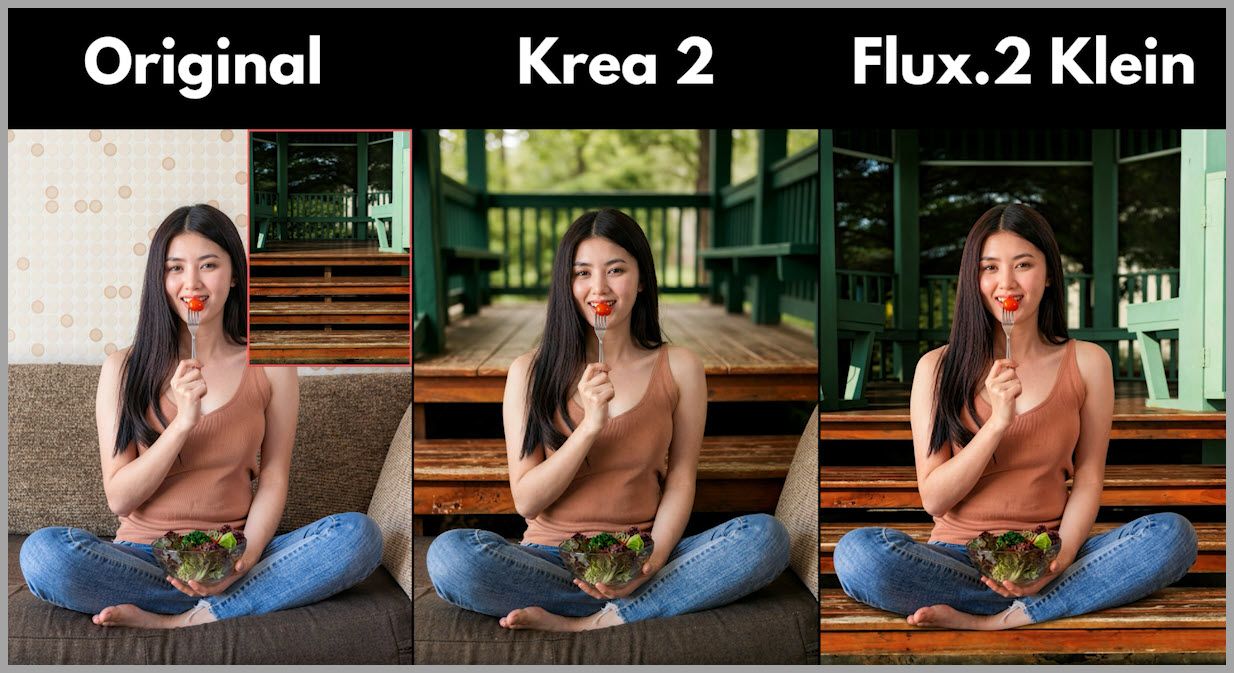
14.1 Flux 2 Klein Result
Flux 2 Klein once again shows strong task understanding.
It uses the staircase reference to create a much more complete background transformation.
The generated image looks more coherent, and the new environment feels properly integrated with the subject.
14.2 Krea 2 Result
Krea 2 does not fully remove the original scene.
Parts of the original sofa remain visible.
This creates a similar problem to what we saw during the single-image cloud background test.
The model introduces the new environment but does not completely commit to replacing the old one.
14.3 Takeaway
This reinforces one of the strongest patterns from the comparison.
Flux 2 Klein generally performs better when the instruction requires the model to understand that a large part of the original scene must be replaced.
Krea 2 tends to preserve too much of the original environment in these examples.
15. Krea 2 vs. Flux 2 Klein: Overall Results
After testing both models across several editing scenarios, a clear pattern begins to emerge.
Neither model wins every category.
Instead, each one has different strengths.
15.1 Where Krea 2 Performs Well
Based on these tests, Krea 2 performs particularly well in several areas.
Object Removal and Reconstruction
In the fork-and-tomato removal task, Krea 2 reconstructed the woman’s hand more successfully than Flux 2 Klein.
That suggests it can be quite capable when an edit requires localized structural reconstruction.
Natural Proportions
During the general face-replacement test, Krea 2 maintained a more believable head size.
Although identity similarity was weaker, overall proportions were better.
Camera-Angle Transformation
This was one of the biggest surprises.
With the Identity Edit LoRA, Krea 2 successfully transformed the viewpoint into a front-right three-quarter angle from a slightly elevated position.
That demonstrates strong potential for geometry-heavy edits when the correct workflow components are used.
15.2 Where Krea 2 Struggles
Krea 2 also showed several recurring weaknesses.
Complex Human-Object Interaction
It failed to perform the request in which the woman needed to use a fork to pick up a cherry tomato from the salad bowl.
Complete Background Replacement
In both the cloud-background test and the staircase-reference test, Krea 2 preserved too much of the original environment.
Pose Preservation During Clothes Swapping
Krea 2 did not maintain the woman’s original pose as effectively when transferring the red dress.
Multi-Image Flexibility
The Krea 2 Edit Grounded Encode node supports only two image inputs.
That may become restrictive in complex reference-driven workflows.
16. Where Flux 2 Klein Performs Well
Flux 2 Klein showed stronger performance in several editing categories.
16.1 Semantic Instruction Understanding
Flux 2 Klein was much better at understanding the fork-and-tomato interaction.
It interpreted the requested action rather than merely applying a visual change.
16.2 Background Replacement
Flux 2 Klein performed much more complete scene transformations.
It successfully understood that the old environment should be replaced instead of partially preserved.
16.3 Clothes Swapping
When transferring the red dress, Flux 2 Klein maintained both:
- Reference clothing consistency
- Original pose consistency
This made its result much more convincing.
16.4 Facial Reference Similarity
During the face-replacement test, Flux 2 Klein produced facial features that were noticeably closer to the reference image.
Although the oversized head was a problem, the identity itself was transferred more accurately.
16.5 Multi-Image Workflow Flexibility
The NKD Klein Presampling node can accept up to eight images.
This makes Flux 2 Klein much easier to use for complex workflows involving several references.
That flexibility alone may make it the more practical option for some advanced ComfyUI setups.
17. Where Flux 2 Klein Struggles
Flux 2 Klein is not flawless.
The comparison revealed at least two important weaknesses.
17.1 Anatomy Reconstruction
When removing the fork and tomato, Flux 2 Klein failed to reconstruct the woman’s hand correctly.
This shows that even a model with strong semantic understanding can still struggle with detailed local anatomy.
17.2 Proportion Control
In the general face-swap test, Flux 2 Klein generated a head that was much too large.
The face itself resembled the reference well, but the incorrect scale made the entire result look unnatural.
For identity-related edits, likeness alone is therefore not enough.
You also need to evaluate:
- Head size
- Neck connection
- Face angle
- Body proportions
- Perspective consistency
18. Which Model Should You Use?
The answer depends on the type of edit you are trying to perform.
There is no single model that is automatically better for every ComfyUI image-editing workflow.
18.1 Choose Krea 2 When…
Krea 2 may be a good choice when:
- You are working with one or two reference images.
- You need localized object removal or reconstruction.
- Natural subject proportions are especially important.
- You want to experiment with major camera-angle changes.
- You are willing to use specialized LoRAs such as the Identity Edit LoRA.
- You want to explore a different editing approach built on top of a strong text-to-image model.
Krea 2 becomes particularly interesting when the workflow is carefully tuned around its strengths.
18.2 Choose Flux 2 Klein When…
Flux 2 Klein may be the better option when:
- You need several reference images.
- The edit involves complex semantic instructions.
- The subject must interact with specific objects.
- You want to perform large-scale background replacement.
- You are doing reference-based clothes swapping.
- You need stronger visual similarity to a reference face.
- You want a simpler and more flexible multi-image workflow.
For general multi-reference editing, its ability to accept up to eight images is a significant practical advantage.
19. Final Comparison Summary
Based on the examples tested in this workflow, the results can be summarized like this:
| Editing Task | Krea 2 | Flux 2 Klein |
|---|---|---|
| Remove fork and tomato | Better hand reconstruction | Hand reconstruction failed |
| Facial teeth detail | Some misalignment | Cleaner result |
| Change outfit to floral dress | Good | Good |
| Pick up tomato with fork | Struggled / did not perform edit | Strong result |
| Change background to clouds | Incomplete replacement | Strong result |
| Change camera angle | Strong with Identity Edit LoRA | Competitive editing option |
| General face replacement | Better head proportions | Better facial similarity |
| Clothes swap | Pose consistency weaker | Better overall result |
| Reference background swap | Original sofa remained | Better scene replacement |
| Multi-image support | Up to 2 images in Grounded Encode | Up to 8 images |
This table should not be interpreted as a permanent benchmark.
Image-generation results can vary depending on:
- Prompt wording
- Seeds
- Model version
- LoRA strength
- Sampler
- Guidance values
- Resolution
- Source-image complexity
- Custom-node configuration
However, the tests give us a useful picture of the different tendencies of the two models.
20. Conclusion
Krea 2 is much more interesting as an image-editing model than you might expect.
With the Krea 2 Edit Grounded Encode node, the Krea 2 Edit Source Patch node, and an appropriate editing LoRA, it can perform substantial edits while remaining aware of the original image.
It also delivered some genuinely impressive results, particularly in localized reconstruction and camera-angle transformation.
Flux 2 Klein, however, demonstrated stronger semantic understanding across many of the more complicated editing scenarios.
It handled:
- Human-object interaction
- Background replacement
- Clothes swapping
- Multi-image conditioning
particularly well.
Its ability to accept up to eight reference images also makes it more convenient for complex ComfyUI workflows.
The most useful conclusion, therefore, is not that one model completely replaces the other.
Instead:
Krea 2 and Flux 2 Klein are strong in different areas.
If you care about geometry changes, localized reconstruction, or experimenting with LoRA-assisted editing, Krea 2 is absolutely worth exploring.
If your workflow depends heavily on complex instructions, several reference images, clothes transfer, object interaction, or major scene replacement, Flux 2 Klein currently looks like the more flexible option based on these tests.
The best approach is to keep both available and choose the model based on the editing task in front of you.
If you want to reproduce the comparison yourself, use the accompanying workflow and test both branches with the same prompts and reference images. That will give you the clearest idea of which model works best for your own projects.
And as both model ecosystems continue to evolve, specialized workflows, new LoRAs, and improved ComfyUI nodes may shift the balance again—which is exactly what makes this space so interesting to explore.