Qwen Image 2.1: Text-to-Image and Editing Compared with Krea 2 and Flux.2 Klein
Qwen Image 2.1 has finally arrived, and it brings an interesting idea to the open-source image-generation space: instead of separating text-to-image generation and image editing into different models, it combines both capabilities into a single unified model.
With 7 billion parameters, Qwen Image 2.1 is also relatively practical for local or cloud-based ComfyUI workflows. It can run on consumer GPUs with a reasonable amount of VRAM, which makes it especially interesting for creators who want strong editing capabilities without relying entirely on extremely large models.
But the important question is not simply whether Qwen Image 2.1 works.
The real question is how well it performs compared with other strong open-source models.
In this article, I’ll test Qwen Image 2.1 against two different competitors:
- Krea 2 Turbo for text-to-image generation
- Flux.2 Klein for image editing
We’ll first walk through the ComfyUI workflows and recommended settings, then compare the generated images across several different tasks.
By the end, you should have a much clearer idea of where Qwen Image 2.1 performs well, where it still struggles, and which model makes the most sense for different types of ComfyUI workflows.
YouTube Tutorial:
Gain exclusive access to advanced ComfyUI workflows and resources by joining our community now!
Setting Up the Text-to-Image Comparison Workflow
For the first test, I compared Qwen Image 2.1 directly against Krea 2 Turbo.
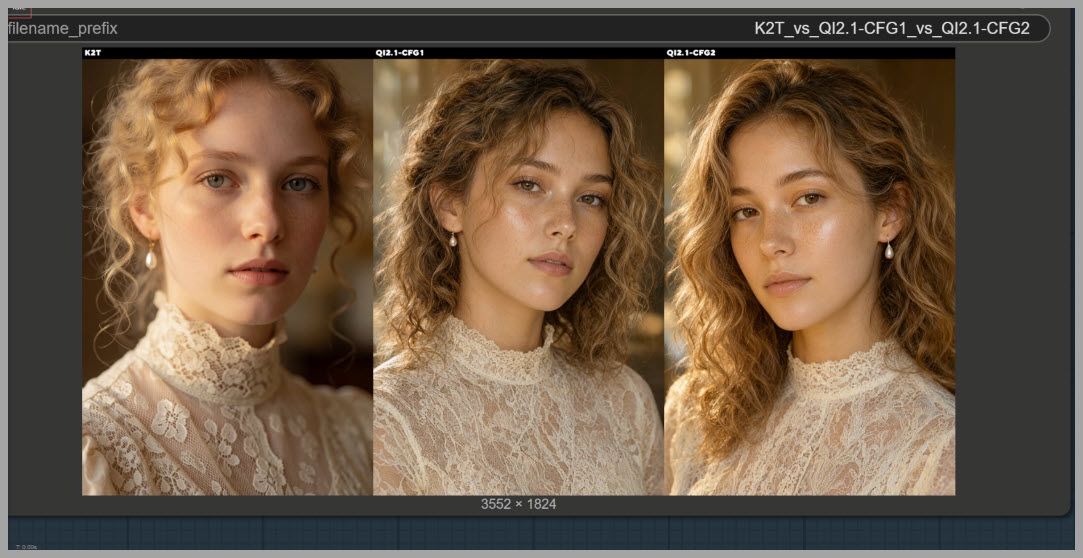
The workflow generates three images from the same prompt.
Download the Workflow:
https://drive.google.com/drive/folders/1l1dLaNOBjSLnMxSQpbeNrjXttn-7cWMn
The outputs are:
- Krea 2 Turbo
- Qwen Image 2.1 with CFG 1
- Qwen Image 2.1 with CFG 2
This gives us two useful comparisons at once.
First, we can compare Qwen Image 2.1 against Krea 2.
Second, we can see how changing the CFG value affects Qwen itself.
Choosing the Model Precision
For Qwen Image 2.1, I used the BF16 version.
I strongly recommend using BF16 when image quality is your priority.
For Krea 2 Turbo, I also used the BF16 model.
Using comparable model precision helps keep the test as fair as possible and avoids introducing unnecessary quality differences caused by quantization.
Choosing the Correct CLIP Model
The text encoder configuration is important.
For Qwen Image 2.1, you should use the 8B CLIP version.
For Krea 2, however, you need to use the 4B version.
Do not simply reuse the Qwen text encoder configuration for Krea.
If you accidentally select the 8B version while running Krea 2, the KSampler will return an error.
So the basic rule is:
- Qwen Image 2.1 → 8B
- Krea 2 → 4B
Using the Qwen Image Text Encoder
Qwen Image 2.1 has a dedicated text encoder node.
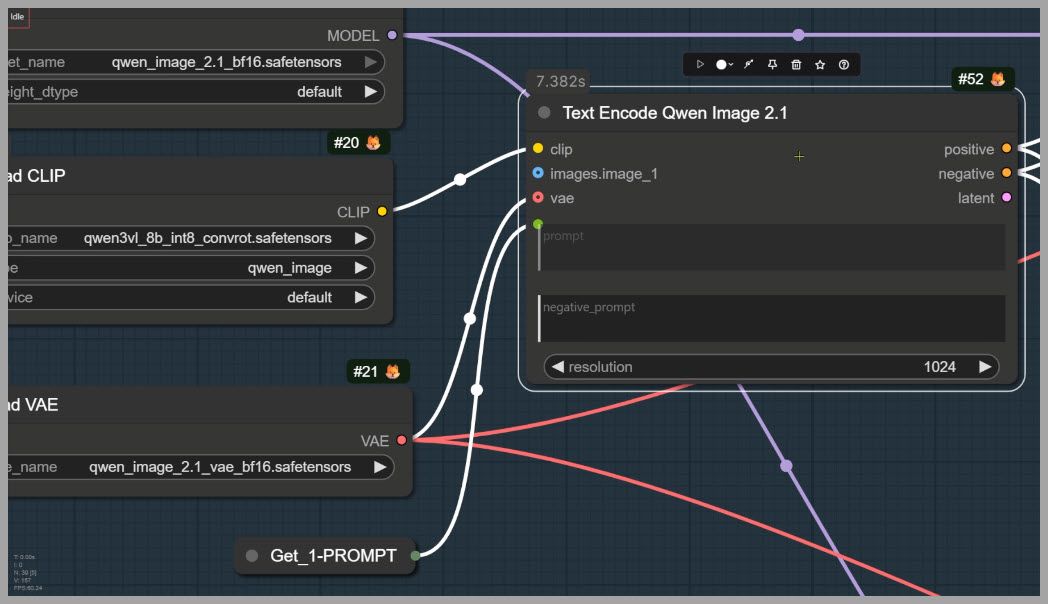
This node is useful because it works for both generation and editing workflows.
For basic text-to-image generation, you can simply feed your prompt into the node as normal.
For image editing, the same node also accepts reference images.
Once you connect one reference image, additional image input ports automatically appear.
You can continue adding references until you have a maximum of 10 reference images connected.
That makes this node especially useful for more complex editing workflows, which we will explore later.
Configuring the KSampler
For this comparison, I set the number of sampling steps to 40.
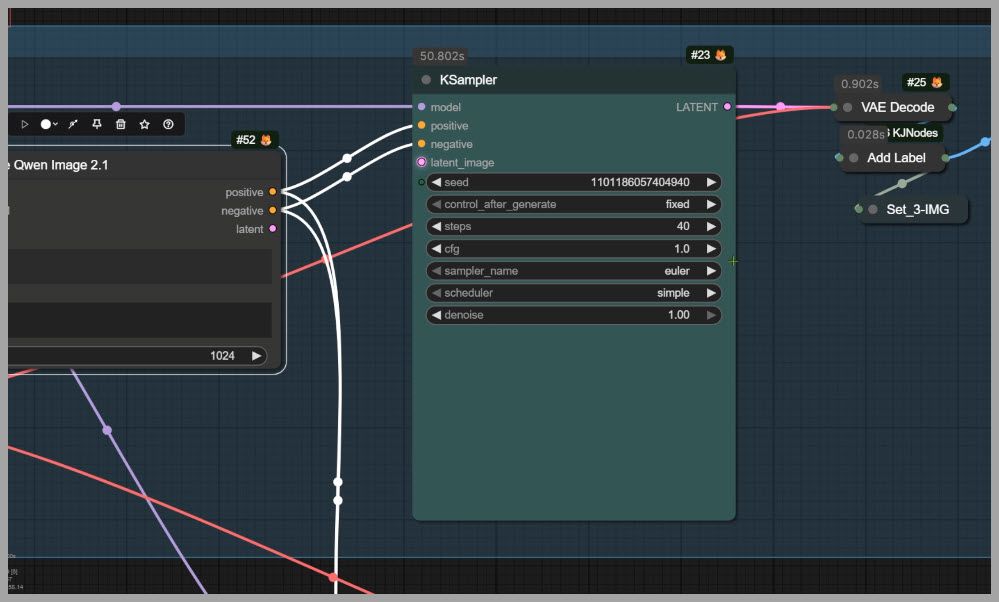
The ComfyUI team recommends roughly 25 steps, which is already enough for many situations.
However, if your GPU can handle the extra workload, increasing the step count to 40 can produce slightly better detail.
For the first Qwen output, I used:
- Steps: 40
- CFG: 1
For the second Qwen output, I kept everything the same except:
- CFG: 2
This allows us to isolate the effect of CFG.
Output Resolution and Generation Time
The final image resolution was:
1184 × 1824 pixels
At this resolution, Qwen Image 2.1 took around 51 seconds to generate an image in my test.
Krea 2 required approximately 37 seconds.
So Qwen is slower in this configuration.
However, I would not treat generation speed as the most important factor right now.
Models like this often receive optimization nodes, acceleration techniques, or custom LoRAs shortly after release.
The more useful question is how good the actual images are.
Keeping the Test Fair
To make the comparison meaningful, both model groups used the same core inputs.
They shared:
- The exact same text prompt
- The same empty latent image
- The same starting seed
This helps reduce randomness and makes differences between the outputs easier to attribute to the models themselves.
Qwen Image 2.1: CFG 1 vs. CFG 2
Before comparing Qwen against Krea 2, it is worth comparing Qwen against itself.
The two Qwen images were generated with identical settings except for CFG.
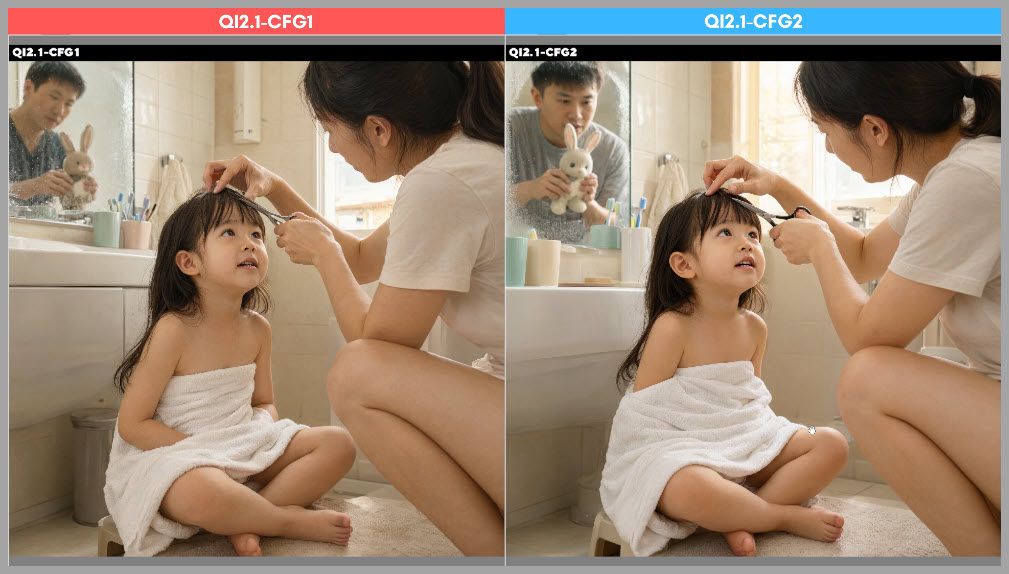
The first image used CFG 1.
The second used CFG 2.
When we zoom into the images, the difference becomes noticeable.
Problems at CFG 1
The CFG 1 result contains several visible artifacts.
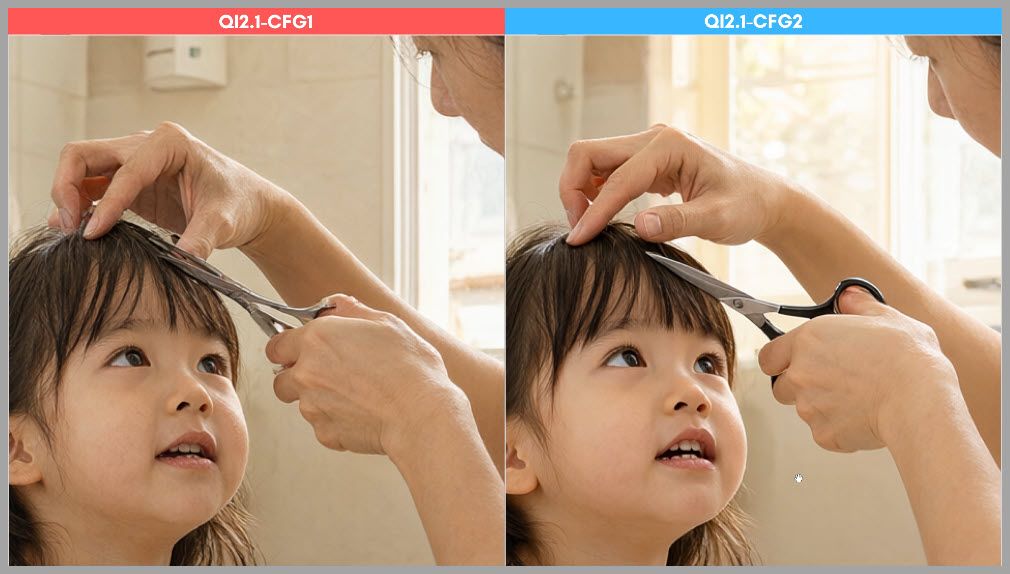
The most obvious problems appear around:
- The hands
- The scissors
- Small object details
The geometry is less stable, and some elements look slightly malformed.
The reflection of the man in the mirror also lacks clarity.
Improvements at CFG 2
Increasing CFG to 2 improves several of these details.
The hands and surrounding objects become more coherent, and the mirror reflection is noticeably sharper.
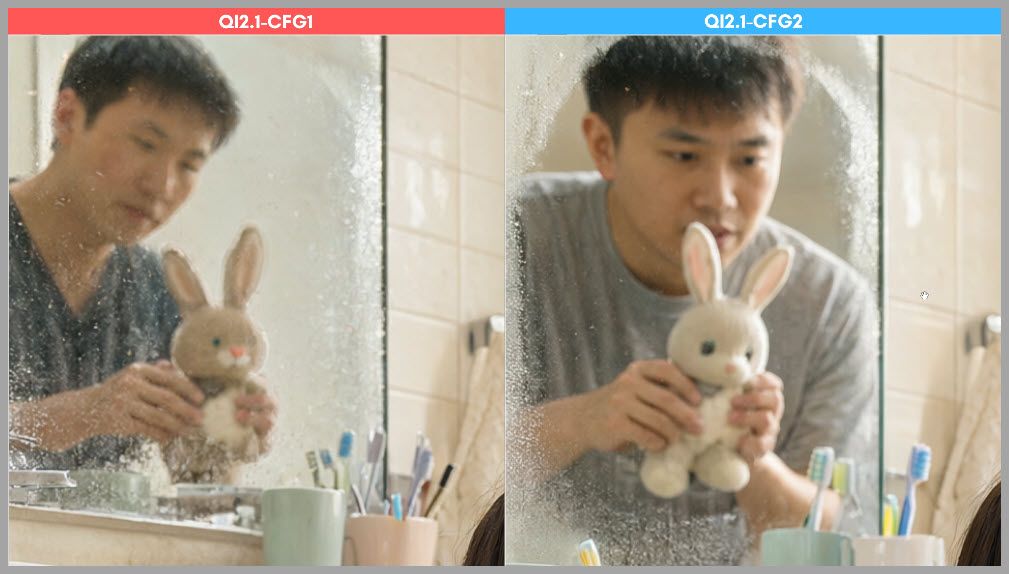
The entire image feels more controlled.
This does not mean CFG 2 will always be perfect, but in basic text-to-image generation, it appears to be a better starting point than CFG 1.
So for Qwen Image 2.1 text-to-image workflows, I would generally start around:
CFG 2
and then adjust from there.
Qwen Image 2.1 vs. Krea 2: Prompt Adherence
Next, let’s compare Qwen Image 2.1 directly with Krea 2.
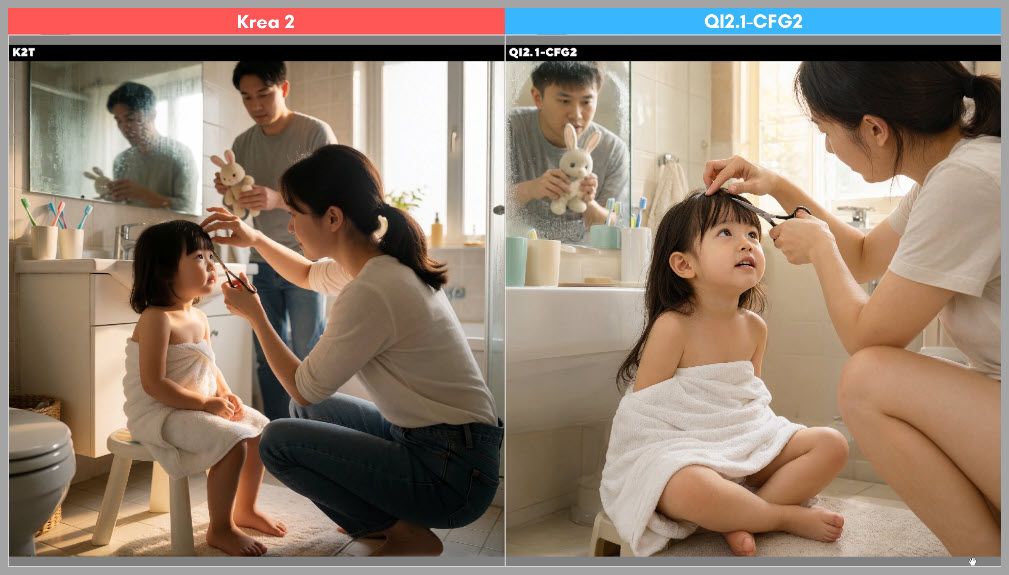
The prompt described a scene in which a little girl should be sitting on a small stool.
Her feet should be resting on a bathroom mat.
This gives us a useful way to evaluate whether the model understands relationships between objects.
Stool and Bathroom Mat Geometry
In the Qwen result, the stool and the bathroom mat appear to be almost the same height.
That creates a strange spatial relationship.
The scene does not fully make sense physically.
In the Krea 2 image, the relationship between the stool, the girl, and the floor is much more believable.
Missing Bathroom Details
The Qwen output also struggles with the bathroom sink.
The sink does not look especially convincing, and the faucet is missing.
These kinds of small scene details matter because they reveal whether the model is actually following the prompt rather than simply producing a visually plausible image.
In this example, Krea 2 follows the requested scene more accurately.
Human Anatomy: A Weak Point for Qwen Image 2.1
Another area where Qwen Image 2.1 can struggle is human anatomy.
I generated several unsuccessful examples where the body structure looked clearly wrong.
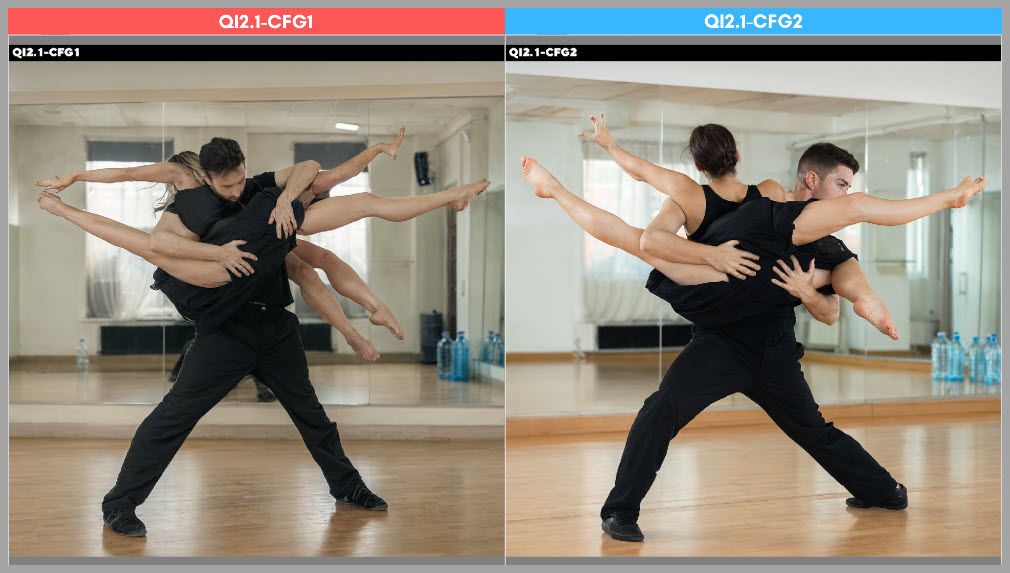
These were not just minor hand defects.
Some of the anatomy problems affected larger parts of the figure.
Increasing CFG Does Not Always Fix Anatomy
One important observation is that increasing CFG does not automatically solve these structural errors.
CFG 2 improves certain textures and details, but anatomy problems can remain.
That tells us the issue is not simply weak prompt guidance.
The model itself sometimes struggles to construct a physically coherent human body.
Comparing Krea 2
When I generated the same kind of scene with Krea 2, the figure looked normal.
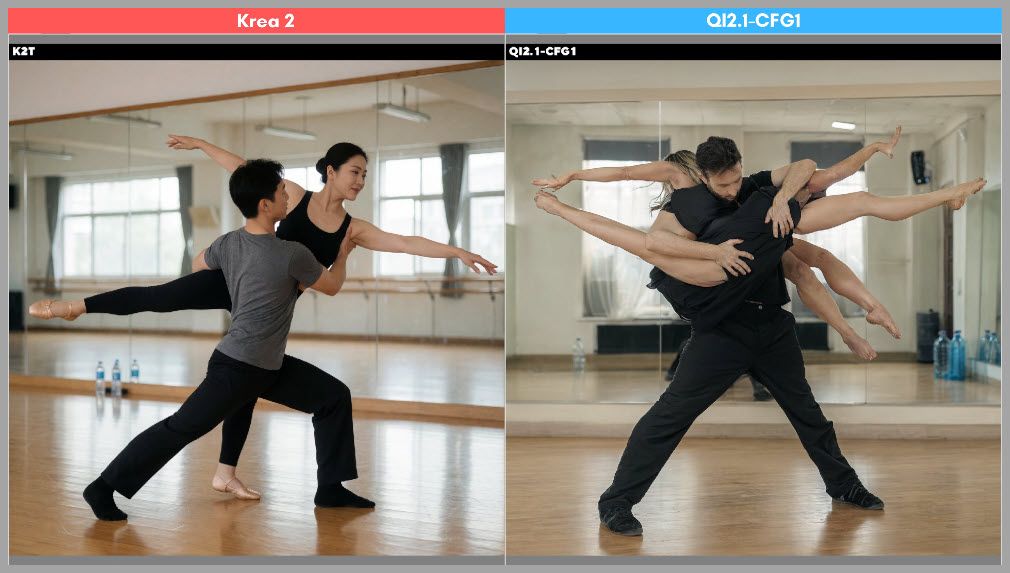
This does not mean Krea 2 will never produce anatomy errors.
All generative image models can fail.
But in these particular tests, Krea 2 was noticeably more reliable.
Facial Details, Skin, and Hair
Next, I compared the models more closely at the facial-detail level.
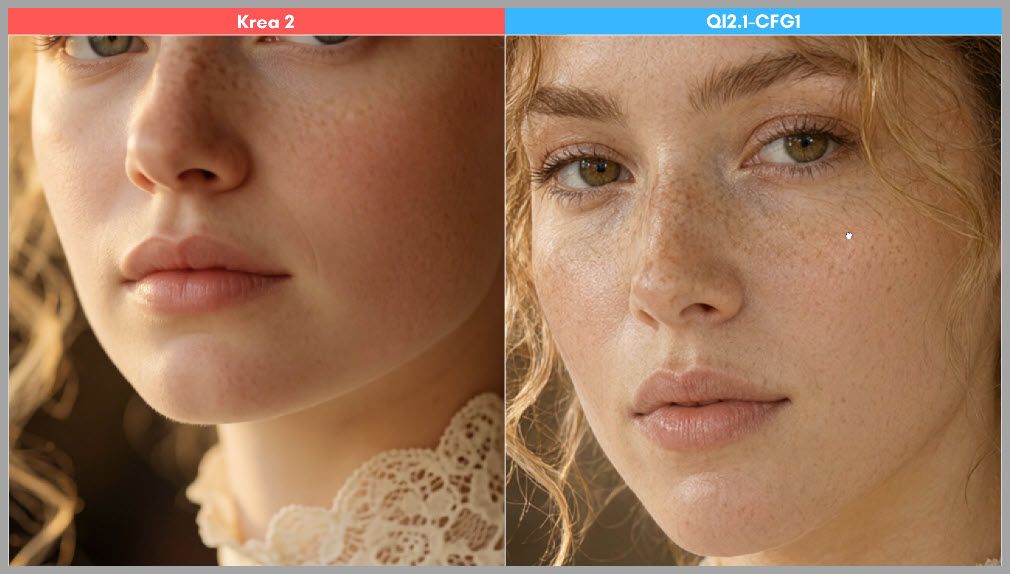
At first glance, Qwen Image 2.1 can appear to produce more detail because the skin contains more visible texture.
However, more texture is not always better.
Excessive Skin Texture
The Qwen output contains a large amount of fine speckling across the skin.
Instead of looking like natural pores or skin texture, the result looks noisy.
The texture feels exaggerated.
Krea 2 produces a smoother and more controlled result.
Hair Rendering
Qwen also struggles with the hair in this example.
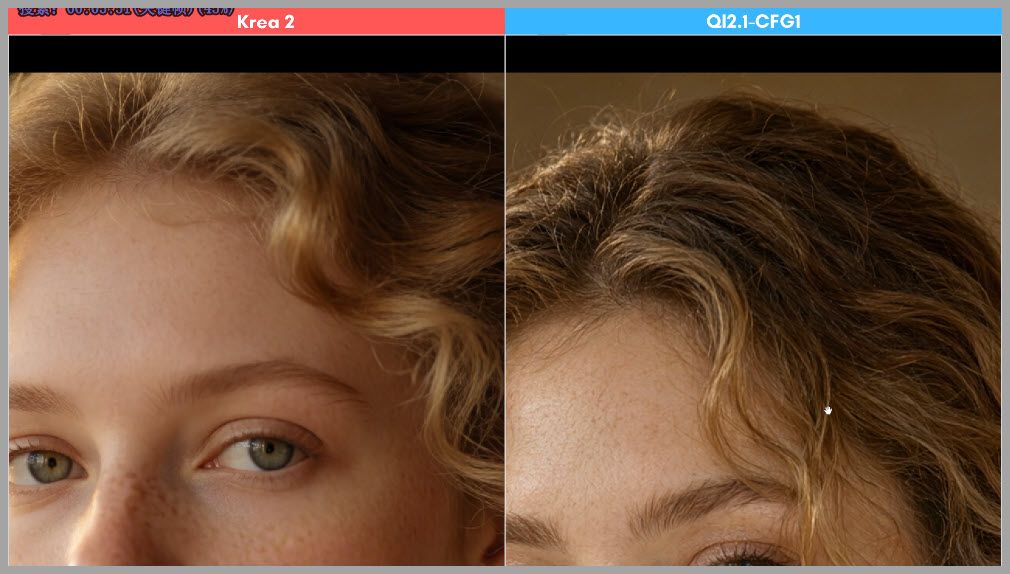
Some of the curls repeat in unnatural patterns.
Other strands appear duplicated.
This makes the hairstyle feel procedurally generated rather than organic.
Krea 2 produces a more believable hair structure.
Fine Fabric Detail: Lace Dress Comparison
Lace is an excellent test for image-generation models because it contains many small overlapping structures.
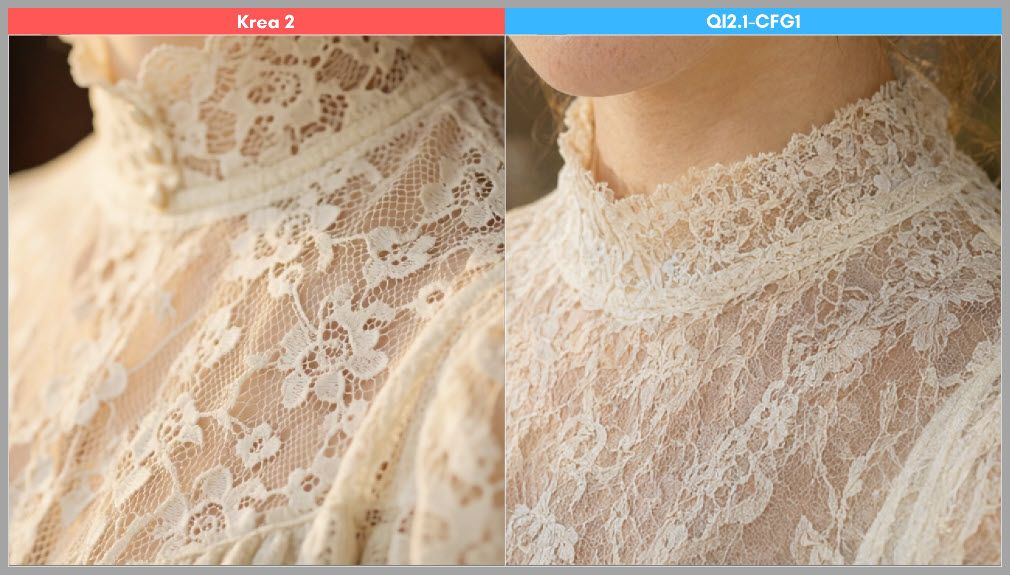
A good model needs to preserve:
- Individual floral patterns
- Tiny holes in the mesh
- Thin boundaries
- Repeating textile structure
The Krea 2 result performs very well here.
The floral elements remain separate, and the holes in the lace are clearly defined.
Qwen’s Fine Details Merge Together
In the Qwen result, many of the lace details blend together.
Instead of clearly separated flowers and mesh, the fabric begins to look like a soft textured mass.
The model understands that the dress should contain lace, but it does not preserve the microstructure as well.
Does CFG 2 Help?
Yes.
Increasing CFG from 1 to 2 improves the lace detail.
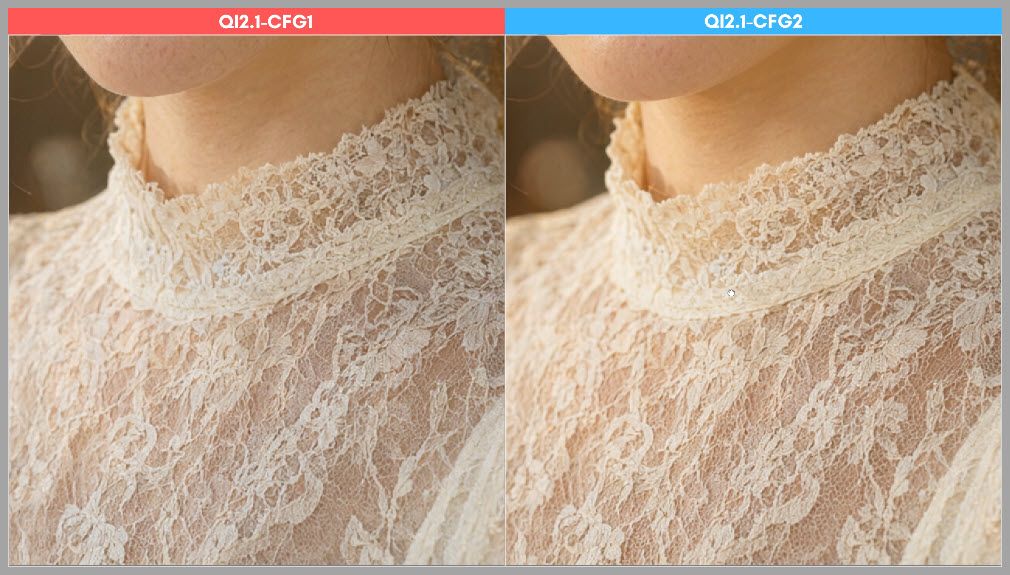
The pattern becomes clearer.
However, even at CFG 2, the result still does not look as crisp as the Krea 2 output in this test.
Text-to-Image Takeaway
After reviewing all of these examples, a pattern begins to emerge.
For basic text-to-image generation, Qwen Image 2.1 does not consistently outperform Krea 2.
Krea 2 performs better in several areas in these tests:
- Prompt adherence
- Human anatomy
- Natural-looking skin
- Hair rendering
- Fine fabric structure
- Small scene details
That might sound disappointing.
However, text-to-image generation is only half of the story.
Qwen Image 2.1 becomes much more interesting when we switch to image editing.
Building the Qwen Image 2.1 vs. Flux.2 Klein Editing Workflow
For the second major workflow, I compared Qwen Image 2.1 against Flux.2 Klein.
This time, the goal was not simply to generate an image from text.
The model had to combine information from multiple reference images.
The task used four references.
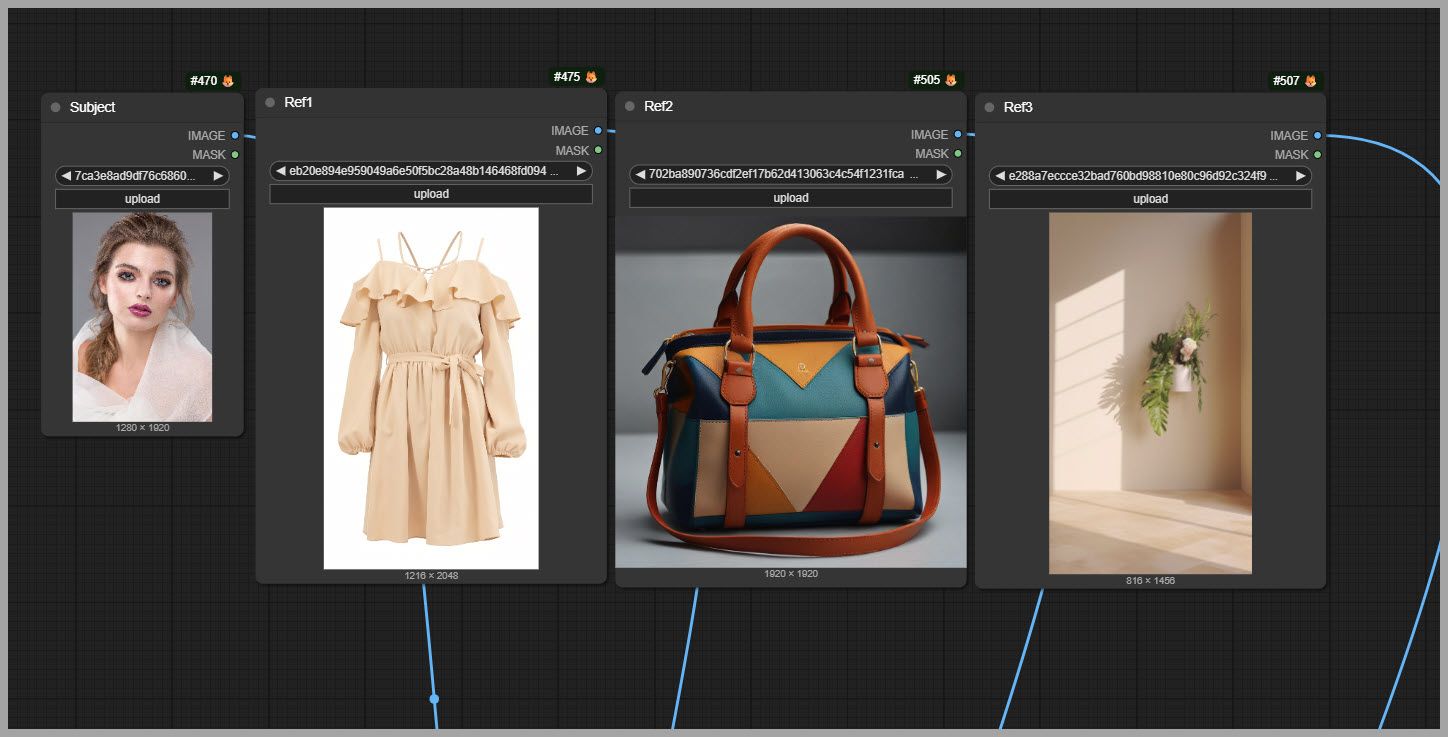
We wanted to:
- Keep the woman from the first image.
- Put her in the dress from the second image.
- Give her the handbag from the third image.
- Place her inside the room shown in the fourth image.
This is a much more demanding task.
The model needs to understand which visual information should come from each image and then combine everything into one coherent final composition.
Connecting Multiple Reference Images to Qwen Image 2.1
For Qwen Image 2.1, the setup is surprisingly straightforward.
I used the same dedicated Qwen text encoder node discussed earlier.
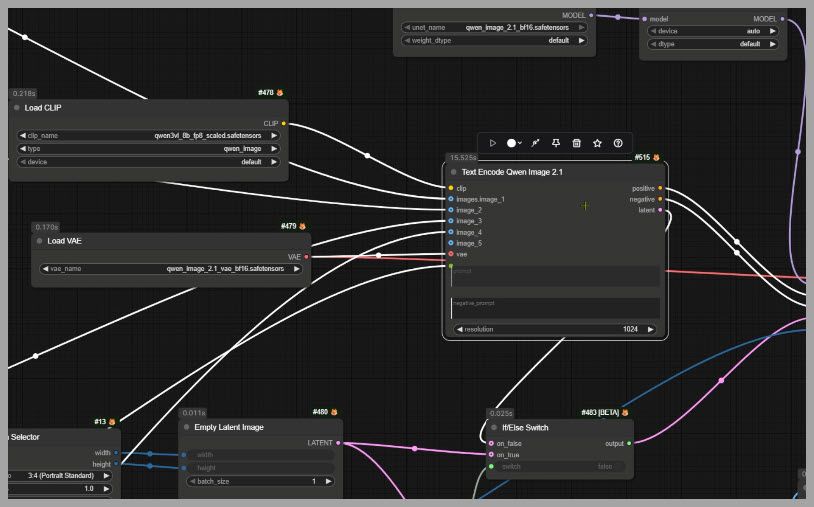
The reference images connect directly into this node.
Once one image is connected, more input ports appear automatically.
You can continue adding reference images until you reach the model’s maximum of 10.
For this workflow, we only need 4.
If you are performing a simpler edit with one image, you do not need to build an entirely different workflow.
Simply remove the extra Load Image nodes and keep the one you need.
Connecting Multiple References to Flux.2 Klein
Flux.2 Klein handles references through a different node.
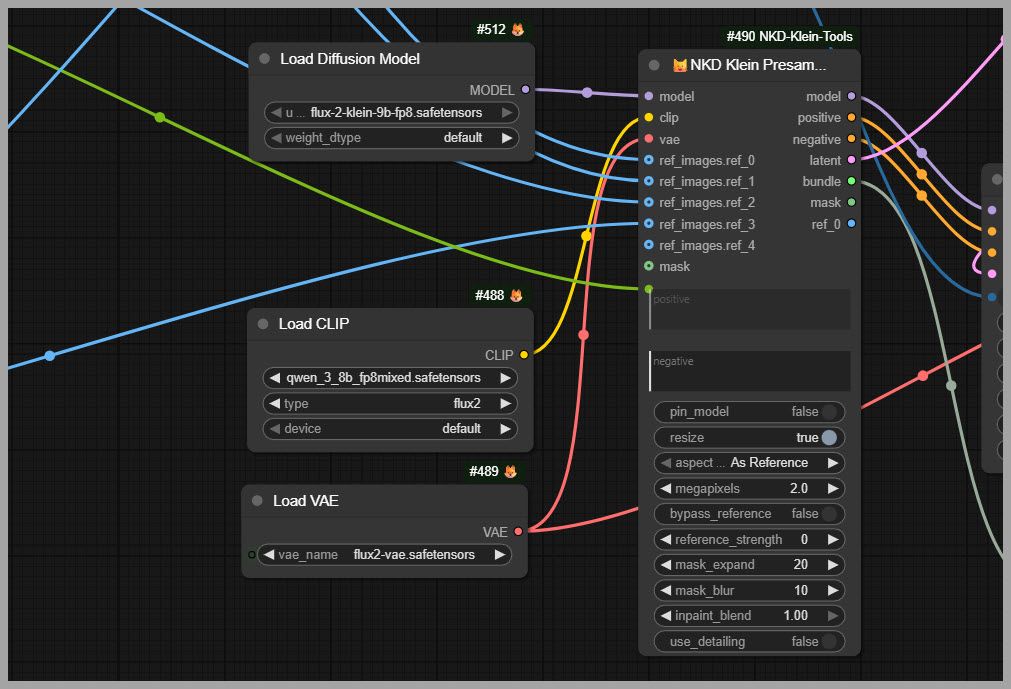
The basic concept is similar: multiple images are fed into the editing pipeline.
However, there is an important limitation.
According to Black Forest Labs’ documentation, Flux.2 Klein supports up to 4 reference images.
That is enough for the workflow in this article, but Qwen offers more room if you are building a much more complex multi-reference composition.
Qwen supports up to 10.
Flux.2 Klein supports up to 4.
Performance Settings for Image Editing
The two models also require very different sampling configurations.
For Flux.2 Klein, the FP8 version works well on Nvidia GPUs.
I used only 4 sampling steps.
Generation took approximately 35 seconds.
For Qwen Image 2.1, I again recommend BF16.
In my testing, the BF16 model produced clearly better results than the FP8 version.
The Qwen workflow used:
- BF16
- 40 sampling steps
- CFG 1
Generation took around 48 seconds.
So Flux.2 Klein is faster in this setup.
However, notice something important about CFG.
For text-to-image generation, Qwen benefited from increasing CFG to 2.
For image editing, CFG 1 works comfortably.
You do not necessarily need to push it higher.
Multi-Reference Editing: Comparing Identity
Now let’s look at the final images.
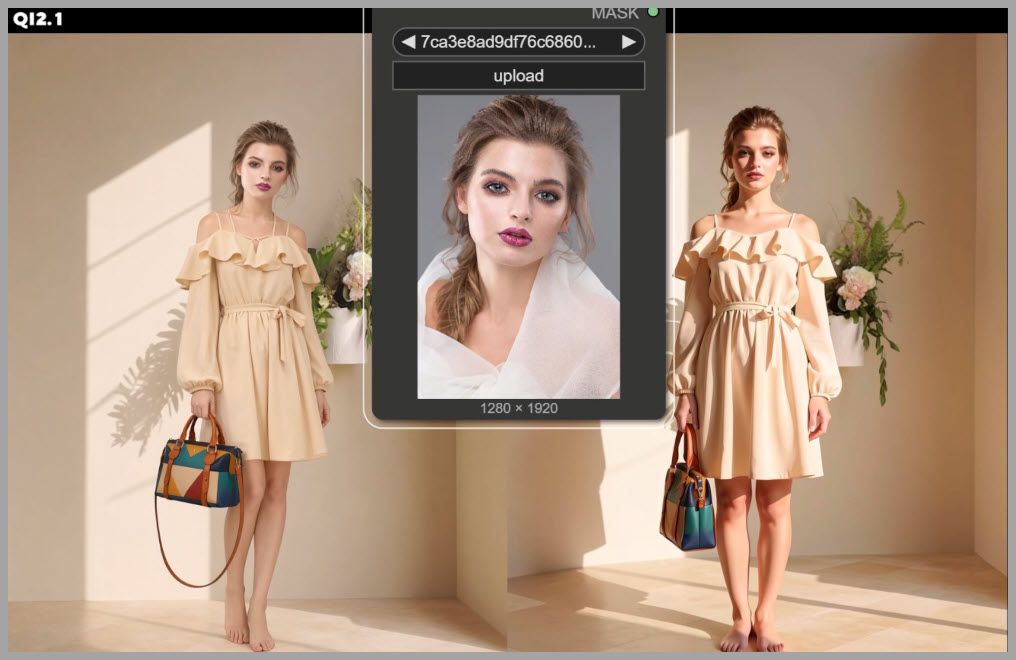
The first thing I wanted to compare was facial identity.
I placed the original headshot next to both generated results.
Qwen Image 2.1 did a very good job preserving the original woman’s face.
The generated identity remains quite close to the reference.
Flux.2 Klein changes the face more noticeably.
The result is still believable as a person, but it does not match the reference as closely.
For identity consistency, Qwen performs very well in this example.
Comparing the Dress
Next, let’s examine the dress.
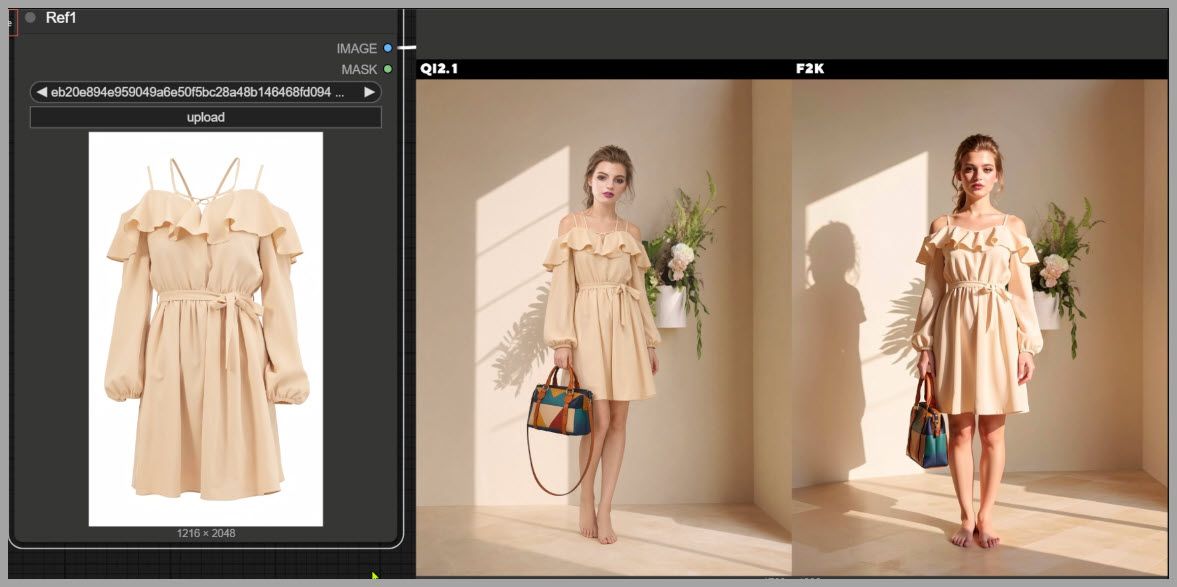
The original reference dress has two straps on each side of the shoulders.
That is a specific design detail.
Flux.2 Klein fails to preserve that structure accurately.
Qwen does a better job keeping the important characteristics of the reference garment.
This again demonstrates one of Qwen’s strengths: reference consistency.
Lighting and Shadows
However, Qwen is not stronger in every area.
The lighting reveals one of its biggest weaknesses.
Flux.2 Klein creates a more natural relationship between the woman and the room.
The light direction and shadows feel more believable.
Qwen, on the other hand, fails to create a realistic shadow for the woman.
The subject looks less integrated into the environment.
This is a recurring issue with Qwen’s editing behavior.
It can preserve source content very well, but it sometimes struggles to transform that content so that it fully belongs in the new scene.
Background Removal and Native Transparency
The next test is especially interesting.
The goal was to remove the background from an image.
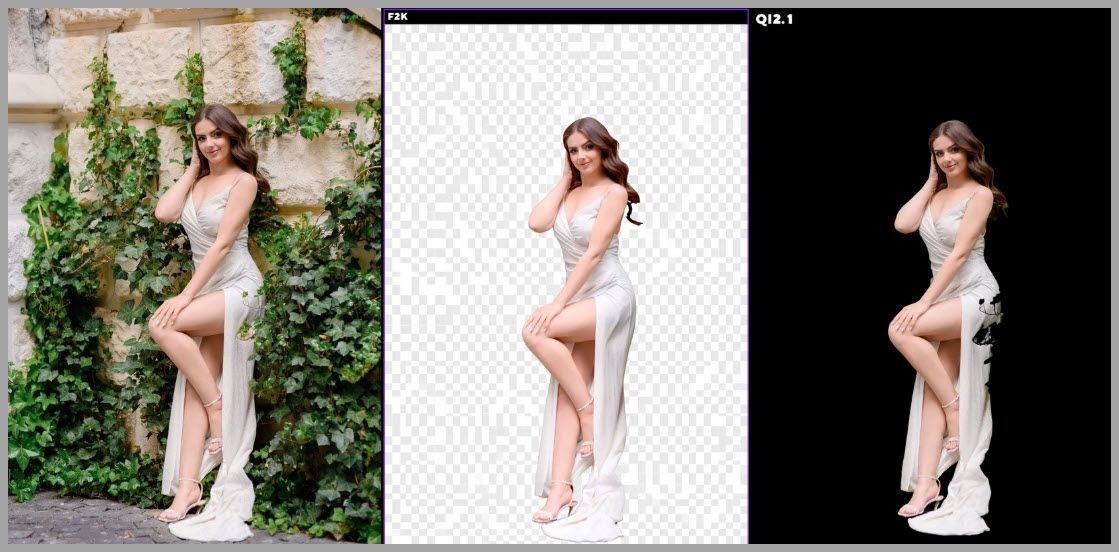
The source image contains leaves partially covering the woman’s dress, so the edit requires more than simply cutting out the silhouette.
The model needs to reconstruct the hidden portions of the subject as well.
Qwen Image 2.1 performs impressively here.
It removes the leaves precisely and produces a clean result.
More importantly, the final image has a transparent background.
Qwen’s Native Transparency
This is one of the most interesting features of Qwen Image 2.1.
Transparency is built directly into the unified model.
You can describe the desired output in the text prompt, and the model can decide whether the result should be:
- A standard RGB image
- An image with a transparency channel
That means you do not necessarily need a completely separate segmentation or background-removal workflow.
For creators working with product images, graphic assets, thumbnails, compositing, or design work, this can be extremely useful.
Flux.2 Klein Comparison
In the same test, Flux.2 Klein removes the visible background visually, but the final result is not truly transparent.
Qwen therefore has a very practical advantage for this particular task.
Pose Editing with Skeleton References
Next, I tested pose changes.
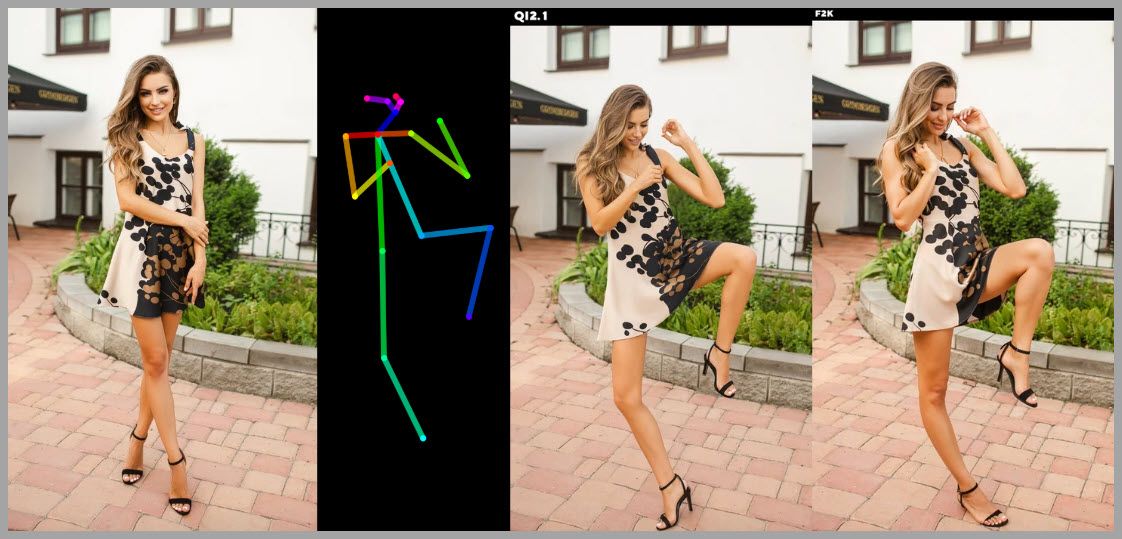
Both Qwen Image 2.1 and Flux.2 Klein can accept a pose skeleton image as a reference.
The goal is to preserve the subject while changing the body position.
In this particular example, Qwen follows the reference pose more closely.
The body arrangement matches the supplied skeleton more accurately.
This makes Qwen very promising for pose-guided character or fashion workflows.
Changing Pose While Preserving the Dress
The next test is more difficult.
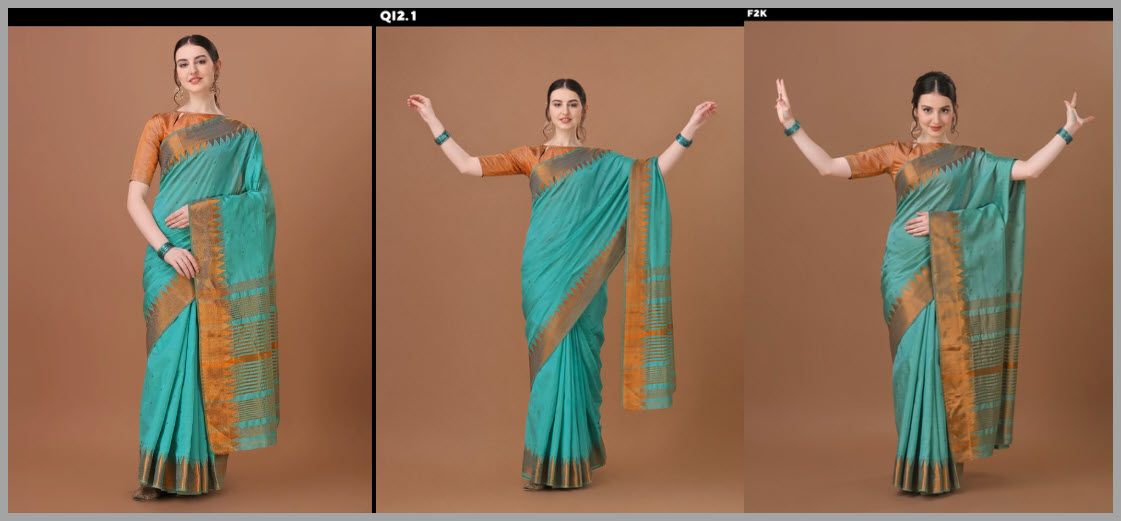
Instead of focusing purely on exact skeleton matching, I wanted to see what happens when the woman opens her arms.
This forces the dress to change shape.
The garment cannot simply remain frozen in its original position.
It needs to react to the new body pose.
Qwen’s Result
Qwen handles this surprisingly well.
The woman changes pose, and the dress changes with her.
The fabric arrangement feels reasonably natural.
At the same time, the model manages to preserve the woman’s identity.
This combination of identity consistency and pose transformation is one of Qwen Image 2.1’s strongest capabilities.
Flux.2 Klein’s Result
Flux.2 Klein struggles more with this particular example.
The arm anatomy is incorrect.
The dress also fails to adapt naturally to the new pose.
Instead of behaving like clothing attached to a moving body, parts of the garment retain an awkward or inconsistent shape.
For this task, Qwen clearly produces the more convincing edit.
Clothing Swap Test
The final editing test involves replacing clothing.
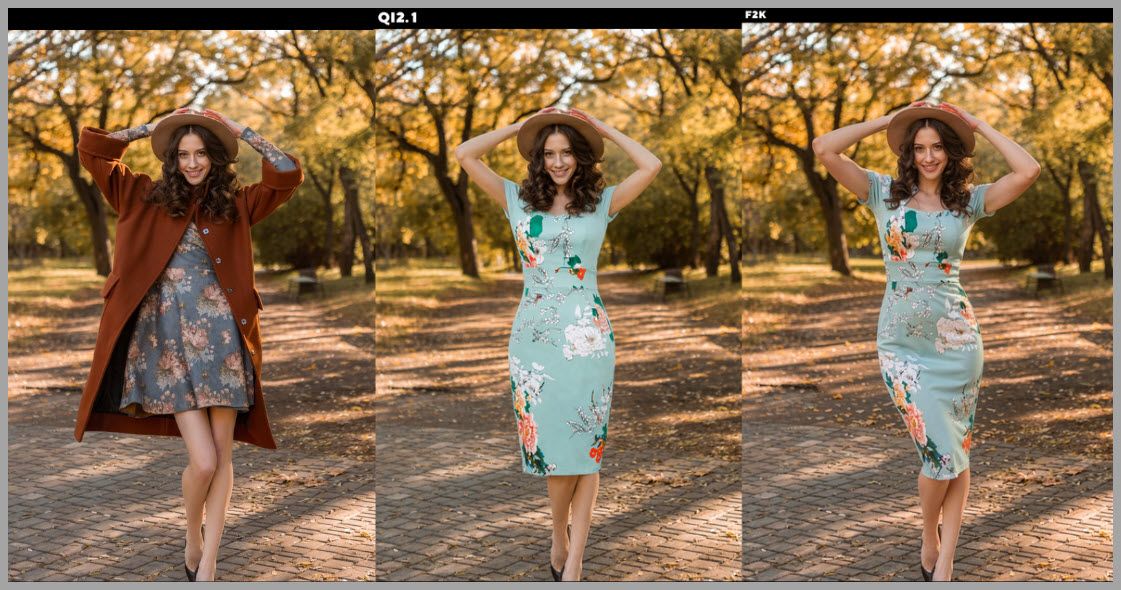
Both models receive a reference dress and need to apply it to the subject.
At first glance, both generated dresses remain fairly close to the original reference.
However, the differences become obvious when we look at lighting and form.
Qwen’s Flat Lighting
The Qwen dress lacks highlights and shadows.
As a result, the material looks flat.
There is very little sense of depth.
It feels more like the reference design has been pasted onto the body than naturally rendered in the scene.
Body Adaptation Problems
The overall shape of the dress also fails to adapt perfectly to the curves of the body.
The garment should deform based on:
- Torso shape
- Pose
- Gravity
- Lighting
- Fabric tension
Qwen preserves the reference appearance, but it does not fully reinterpret the dress according to the new subject.
Flux.2 Klein does a better job with that adaptation.
Its dress integrates more naturally with the body and scene.
So for this specific clothing-swap task, Flux.2 Klein produces the stronger result.
Qwen Image 2.1’s Biggest Strengths
After running these different editing tests, Qwen Image 2.1 shows a very clear set of strengths.
It is particularly good at preserving source information.
That includes:
- Facial identity
- Clothing design
- Pose references
- Multiple visual references
- Fine reference-specific attributes
It is also extremely flexible in the number of references it can accept.
Supporting up to 10 images makes it useful for complicated ComfyUI workflows involving many separate visual constraints.
Native transparent output is another major advantage.
For certain creative workflows, that feature alone could make Qwen worth using.
Qwen Image 2.1’s Biggest Weaknesses
Qwen’s main weakness is adaptation.
It is often very good at remembering what an object should look like.
It is less reliable at changing that object to fit a completely new environment.
This becomes visible in areas such as:
- Lighting
- Shadows
- Object deformation
- Clothing-body interaction
- Scene integration
- Depth
In other words, Qwen can preserve the source extremely well, but sometimes preserves it too literally.
The edited element may not fully react to its new surroundings.
Where Flux.2 Klein Performs Better
Flux.2 Klein behaves differently.
It may not always preserve identity or reference details as strictly as Qwen.
However, it can be more flexible when adapting content to a new scene.
This is especially visible in:
- Lighting
- Highlights
- Shadows
- Garment deformation
- Scene integration
That makes Flux useful for tasks where realism in the new environment matters more than perfect preservation of every source detail.
Final Takeaways
Qwen Image 2.1 is an interesting model because its strongest capabilities are not necessarily where you might expect them.
For pure text-to-image generation, it still has weaknesses.
In these tests, Krea 2 produced better results in several important areas, including prompt adherence, anatomy, facial rendering, hair, and fine textures.
Qwen becomes much more impressive when image editing enters the picture.
Its ability to combine multiple references while preserving identity is excellent.
Pose editing is strong.
Native transparent output is extremely useful.
And support for up to 10 reference images gives it a lot of potential for complex ComfyUI pipelines.
At the same time, Qwen can struggle with adaptation.
Edited objects sometimes fail to respond naturally to new lighting, body shapes, or surrounding environments.
Flux.2 Klein often performs better in those situations.
The most practical approach, therefore, is not to search for one model that wins every comparison.
Instead, choose the model based on the task.
Use Krea 2 when you want strong general text-to-image generation.
Use Qwen Image 2.1 when consistency, reference preservation, pose editing, or transparency matter most.
Use Flux.2 Klein when your edit needs stronger lighting, shadows, and natural integration into a new scene.
And when possible, combine their strengths inside the same ComfyUI pipeline.
That is where workflows like these become especially powerful.
Gain exclusive access to advanced ComfyUI workflows and resources by joining our community now!